Tempest





Tempest: Run AI Coding Agents in Parallel with Zero Conflicts
Overview
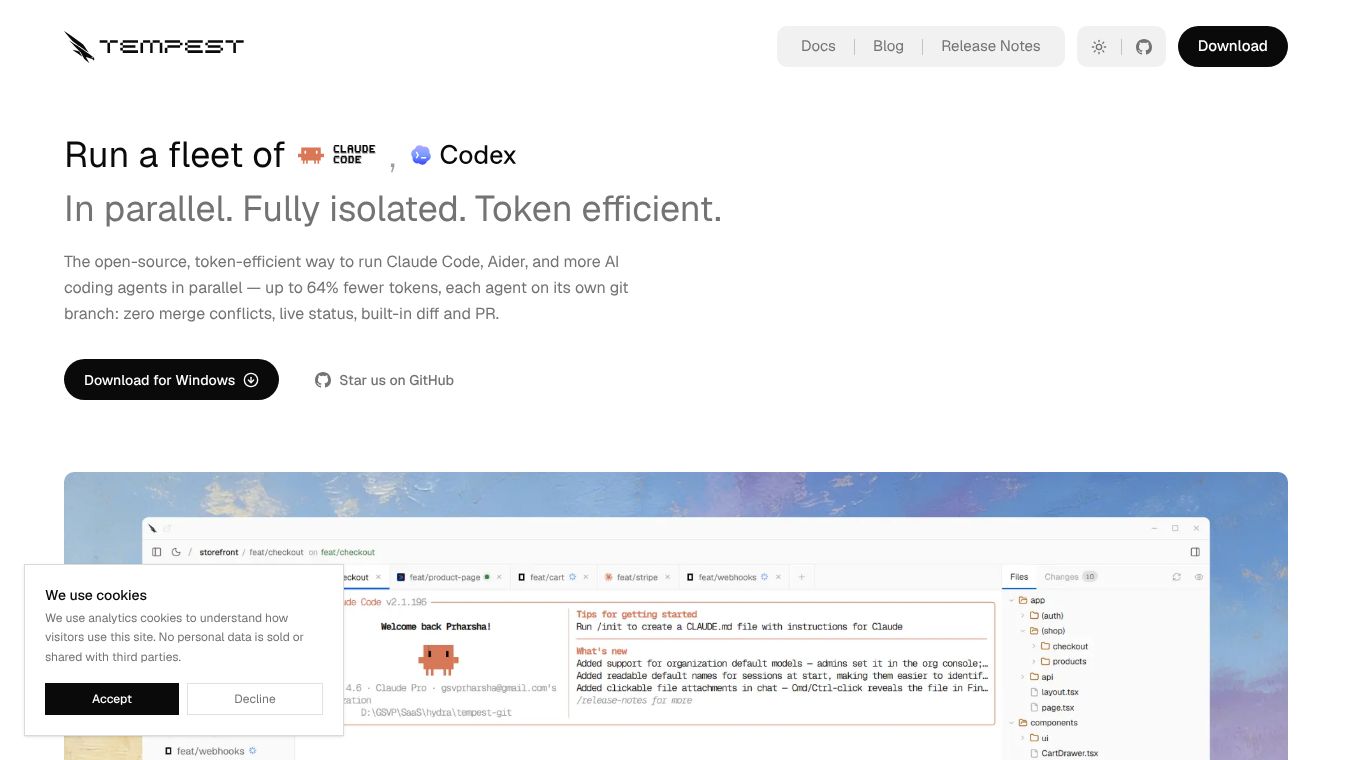
Tempest is an open-source desktop application built for developers who want to use multiple AI coding tools at the same time. It allows users to run agents like Claude Code, Aider, and others in parallel without any issues. The app provides a single window to manage all these sessions while keeping them completely separate. This design ensures that no merge conflicts occur and that each agent works on its own isolated branch. By using a shared local knowledge graph, Tempest reduces the number of tokens needed by up to 64% and cuts down tool calls by up to 58%. This makes the process much faster and more cost-effective for users.
Benefits
Tempest offers several key advantages for developers who need to work efficiently. First, it uses isolated Git worktrees for every session. This means each AI agent operates on its own branch, so they never interfere with each other or overwrite uncommitted changes. If one agent makes a mistake, it stays contained within its own branch, protecting the rest of the project. Second, the app includes token intelligence. It stores a local knowledge graph of the codebase so agents can find relevant information quickly instead of scanning every file. This saves time and reduces costs. Third, Tempest provides session continuity. Users can close a tab and come back later to find the agent exactly where it left off. Finally, the unified interface gives users a clear view of all tasks. Features like live status updates, a built-in diff viewer, and a real-time preview of the development server help users stay in control without switching between multiple windows.
Use Cases
Tempest is designed for a wide range of developers who need to manage complex tasks. Solo builders can run five agents at once to work on five different features simultaneously. This approach can compress a week of work into a single day while keeping all threads organized. Freelancers can use the tool to manage multiple clients. Each client gets their own agent running on a separate branch, which prevents chaos and avoids merge conflicts. Open source contributors can test different solutions for the same problem at the same time. They can drop failed attempts and merge the successful one easily. Teams can also benefit from the tool by ensuring that automated sessions run in isolation. Members can review diffs, push changes, and open pull requests directly within the app. The tool works on Windows, macOS, and Linux, making it accessible to most developers.
Pricing
Tempest is completely free to download and use. There is no account required and no subscription fees. The application runs entirely on the user's machine, which enhances security and privacy. Users can install it on their preferred operating system and start using it immediately without any hidden costs.
Vibes
The community response to Tempest has been positive, especially among developers looking for better ways to manage AI coding workflows. Users appreciate the ability to run multiple agents without worrying about conflicts or data corruption. The focus on privacy is also a major plus since the code never leaves the local environment. Reviews highlight how the tool simplifies the process of testing different approaches and managing multiple projects. The fact that it is open-source and free has made it a popular choice for both individual developers and small teams. Many users feel that Tempest represents a significant step forward in making AI coding assistants more practical and efficient for daily work.
Additional Information
Tempest is an open-source project, which means its code is available for anyone to inspect or contribute to. The development team is actively adding new features on a weekly basis. Future updates will include isolated Postgres instances for each agent, which will further ensure that parallel runs do not corrupt each other's data. Users can report issues or request new features by opening an issue on the GitHub repository. The project continues to evolve as a platform for modern development workflows.
This content is either user submitted or generated using AI technology (including, but not limited to, Google Gemini API, Llama, Grok, and Mistral), based on automated research and analysis of public data sources from search engines like DuckDuckGo, Google Search, and SearXNG, and directly from the tool's own website and with minimal to no human editing/review. THEJO AI is not affiliated with or endorsed by the AI tools or services mentioned. This is provided for informational and reference purposes only, is not an endorsement or official advice, and may contain inaccuracies or biases. Please verify details with original sources.



Comments
Please log in to post a comment.