Agoches





Agoches: A Secure, Agent-Aware Remote Terminal for Mobile
Overview
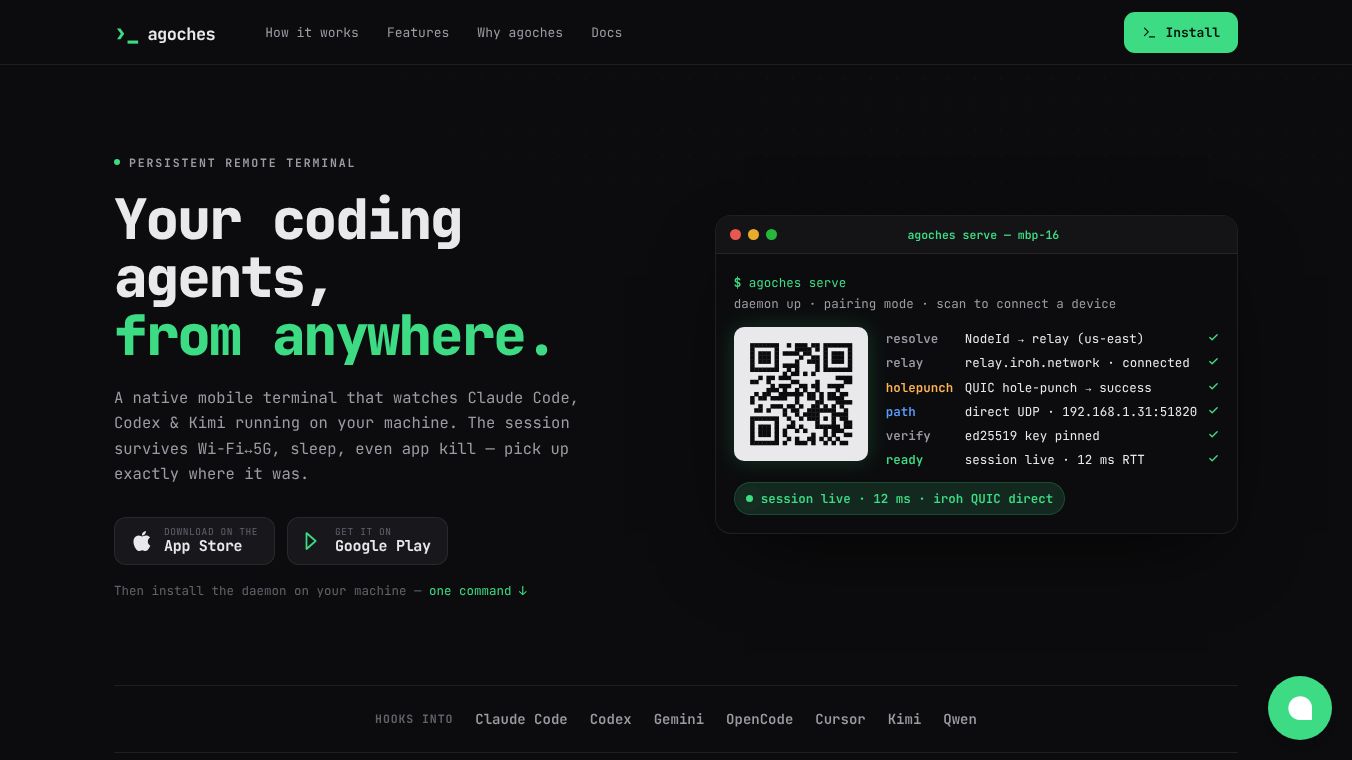
Agoches is a remote access tool designed specifically for managing AI coding agents on mobile devices. It solves a common problem for developers who lose track of long-running AI sessions when they step away from their desktop. By using a direct, encrypted connection and a mobile-friendly interface, Agoches lets users type commands, give voice instructions, approve code changes, and review updates from their phone without breaking the session. It works with popular AI coding tools like Claude Code, Codex, and Kimi.
Benefits
Agoches offers several key advantages for developers who rely on AI agents:
- Secure and Simple Setup:The tool uses a direct peer-to-peer connection that does not require opening ports or configuring firewalls. It identifies machines using public keys instead of IP addresses, which makes it safer and easier to use behind complex networks like mobile data or CGNAT. The connection is protected against man-in-the-middle attacks by default.
- Never Lose Your Session:If your internet connection changes from Wi-Fi to 5G or if your phone goes to sleep, the session stays alive. The system uses a protocol called Mosh to recover the connection automatically, so your AI agent never has to restart its work.
- Built for AI Agents:Unlike standard remote terminals, Agoches includes a special view for managing AI tasks. It turns raw terminal text into a Kanban board that shows the status of every agent. You can see which tasks are running, which need your approval, and which are waiting for input. Each card shows how many tokens have been used and how long the task has been running.
- Easy Code Approval:When an AI agent pauses to ask for your input, the app highlights the task. You can view the proposed code changes in a syntax-highlighted viewer and approve or reject them directly from your phone. You can also browse the file tree and see which files have been modified.
- Native Mobile Experience:The app is built natively for iOS, iPadOS, and Android. It adapts to different screen sizes and supports split views on iPads. You can use hardware keyboard shortcuts on iPads and the interface follows standard design guidelines for both Apple and Android.
Use Cases
Agoches is ideal for developers who use AI coding assistants in their daily workflow:
- Managing Long-Running Tasks:Developers can start a complex coding task on their desktop and then check their phone while they take a break or work on something else. They can monitor progress and intervene if the AI gets stuck.
- Mobile-First Development:Users who frequently switch between devices can continue their coding sessions seamlessly. They can type commands or paste screenshots into prompts directly from their mobile device.
- Team Collaboration:While focused on individual agent management, the clear status boards help team members understand the state of automated coding tasks without needing to log into a desktop terminal.
- Remote Work:The ability to connect securely without port forwarding makes it perfect for users who work from home or travel and need to access their development environment from anywhere.
Pricing
The article does not provide specific pricing details for Agoches. It mentions that Pro subscriptions are handled through the App Store or Google Play, but it does not list the cost of these plans.
Vibes
The article does not include specific user reviews, testimonials, or public reception data. It describes the product as being in various beta stages, such as v0.4.0beta and v0.3.0beta, indicating it is still being developed and refined.
Additional Information
Agoches is built on a privacy-first philosophy. It acts only as a transport layer and does not read terminal output, source code, or session contents. Credentials are stored locally on the user's device and are unlocked only by biometrics like Face ID. The service collects minimal analytics, such as crash reports and feature usage, with an option for users to opt out. The software supports macOS, Linux, iOS 16 and later, iPadOS, and Android 12 and later. Recent updates have added features like a file browser for agent working trees, remote clipboard support, and support for hardware keyboards on iPads.
This content is either user submitted or generated using AI technology (including, but not limited to, Google Gemini API, Llama, Grok, and Mistral), based on automated research and analysis of public data sources from search engines like DuckDuckGo, Google Search, and SearXNG, and directly from the tool's own website and with minimal to no human editing/review. THEJO AI is not affiliated with or endorsed by the AI tools or services mentioned. This is provided for informational and reference purposes only, is not an endorsement or official advice, and may contain inaccuracies or biases. Please verify details with original sources.

Comments
Please log in to post a comment.