Wondershare Filmora





What is Wondershare Filmora?
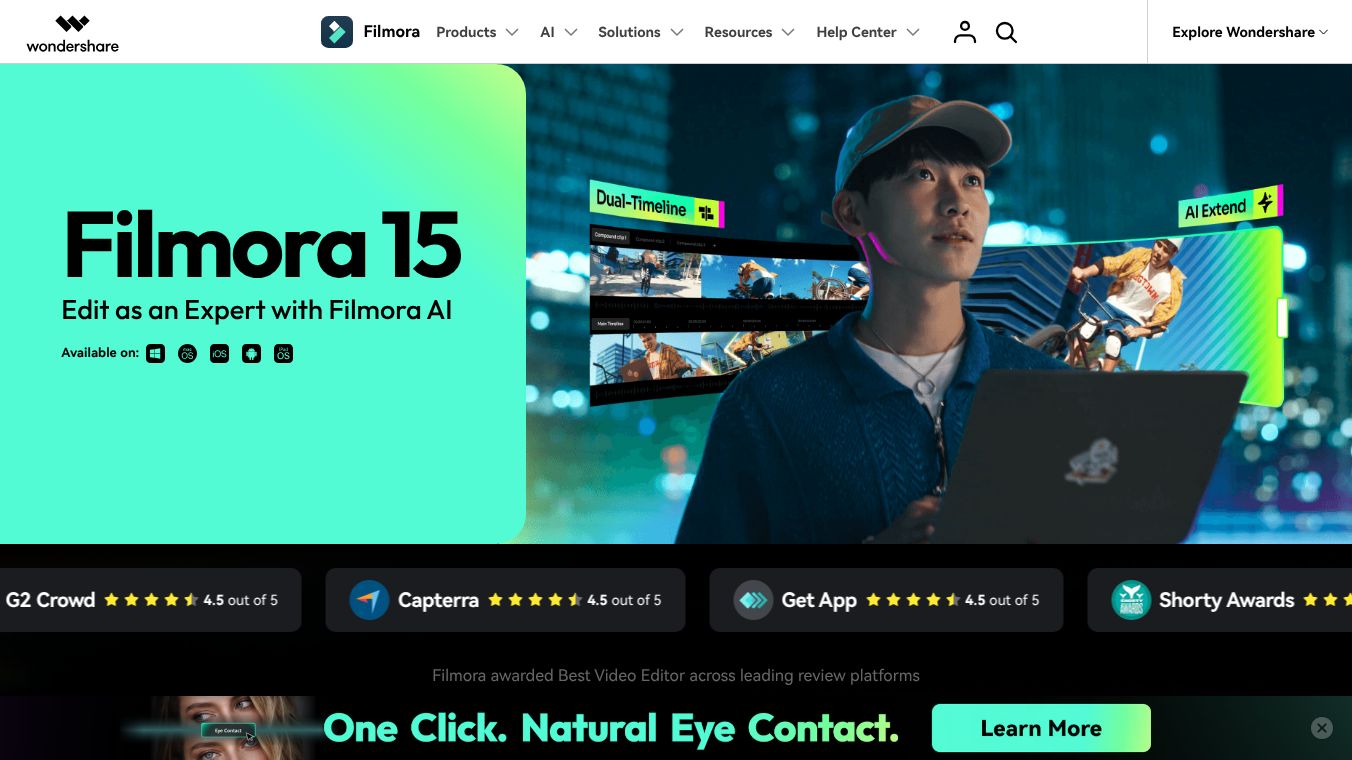
Wondershare Filmora is a video editing software designed for people who want to create professional-looking videos without needing advanced technical skills. It works on computers, tablets, and mobile phones. The program is known for its easy-to-use interface and powerful artificial intelligence tools that help users edit footage quickly. It is trusted by millions of creators ranging from beginners to professionals.
Benefits
Filmora offers several key advantages for video creators. The most notable feature is its AI technology, which allows users to turn simple ideas into video clips instantly. Tools like AI Extend automatically fill in missing parts of a scene, while AI Styling adjusts the look of footage to match a specific mood. A unique feature called Beautify Face improves video quality by making faces look polished and natural with just a few clicks. The software also includes a massive library of over 2.9 million royalty-free assets such as music, stickers, and transitions that can be used for commercial projects. For those who need more control, the program provides professional tools like dual timelines, keyframes, and color grading. Users appreciate the clean interface that makes complex editing tasks feel simple. The ability to export directly to YouTube and support for 4K video rendering further enhances its appeal.
Use Cases
Filmora is suitable for a wide variety of users and projects. Beginners can use it to create social media posts, travel vlogs, or family videos without struggling with complicated software. Content creators and YouTubers can utilize the built-in templates and music library to produce engaging videos faster. Professionals can leverage the advanced motion control and data visualization tools to make marketing videos or corporate presentations. The cross-platform availability means that creators can start editing on a desktop computer and continue on a tablet or phone. It is also ideal for children's book authors who need to add animation to their stories. The commercial availability of many resources makes it a safe choice for businesses and brands that need to publish their content publicly.
Pricing
Pricing details for Wondershare Filmora are not available in the provided information. Users typically purchase the software through official channels or app stores, but specific costs are not listed here.
Vibes
Users and reviewers consistently rate Filmora highly, giving it a score of 4.5 out of 5 on platforms like G2 Crowd and Capterra. Testimonials highlight the software as a perfect balance between power and simplicity. Many users praise the intuitive design that allows them to edit without a steep learning curve. The versatility of the tool is frequently mentioned, with users noting that it packs everything needed for video editing into one package. The quality enhancement features, particularly the Beautify Face tool, are described as game-changers for improving video quality. The extensive library of music and effects is often cited as a time-saving asset that helps users create professional-looking videos effortlessly. Overall, the community feedback suggests that Filmora is a reliable and trusted choice for video production needs.
Additional Information
Wondershare Filmora 15 supports GPU acceleration to speed up rendering on compatible systems. It integrates Metal rendering to work smoothly with the latest Mac hardware. The software supports various export formats including MP4, MOV, AVI, and MKV. There is a YouTube integration feature that allows users to upload videos directly from the program. If users purchase the software through the Google Store or Apple Store, they must log in with their respective accounts for authorization. Refunds for these specific purchases are handled by the app stores rather than the software vendor directly. The platform provides FAQs to help users understand commercial usage rights and technical specifications.
This content is either user submitted or generated using AI technology (including, but not limited to, Google Gemini API, Llama, Grok, and Mistral), based on automated research and analysis of public data sources from search engines like DuckDuckGo, Google Search, and SearXNG, and directly from the tool's own website and with minimal to no human editing/review. THEJO AI is not affiliated with or endorsed by the AI tools or services mentioned. This is provided for informational and reference purposes only, is not an endorsement or official advice, and may contain inaccuracies or biases. Please verify details with original sources.


 No Info

Comments
Please log in to post a comment.