TrustScan





TrustScan: AI-Powered Gmail Security Against Phishing, Scams, and AI-Generated Content
Overview
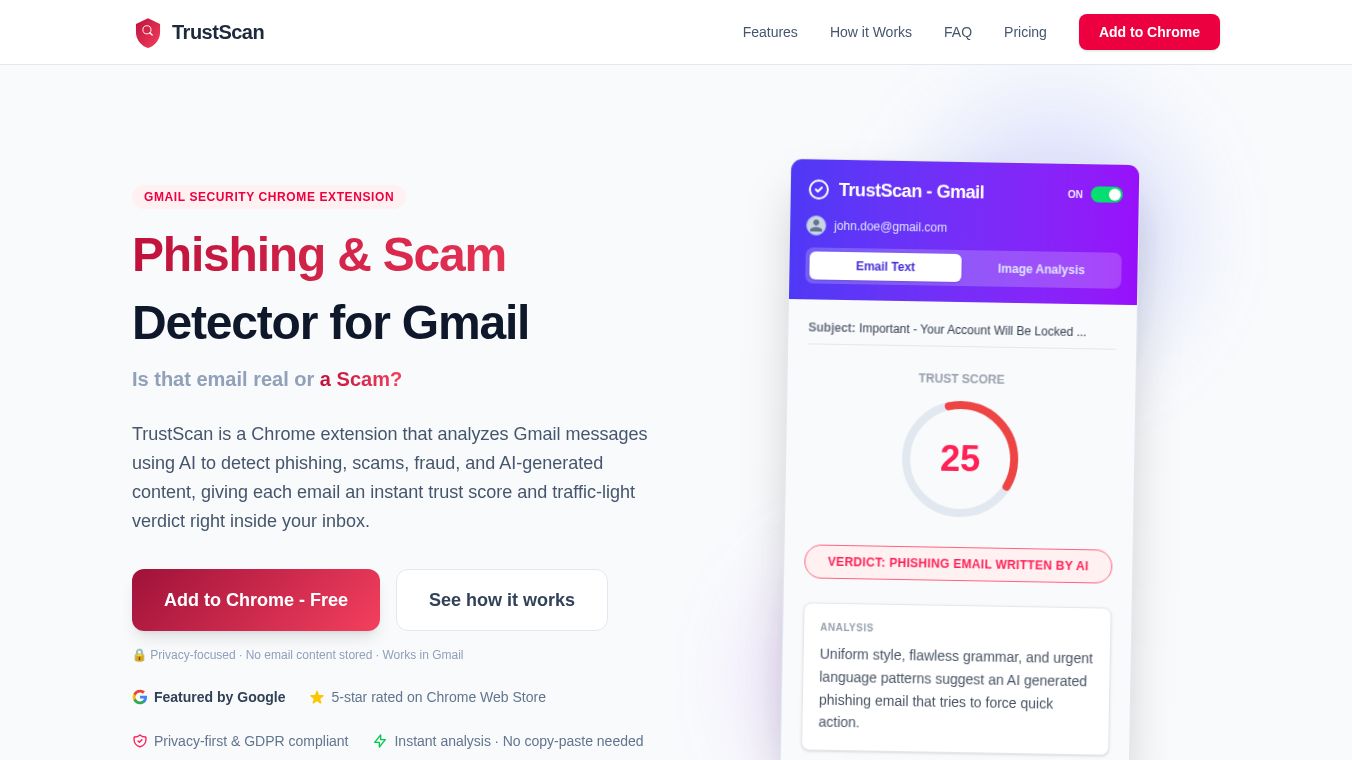
TrustScan is a Chrome browser extension designed to enhance Gmail security by analyzing messages using Artificial Intelligence. It detects phishing attempts, scams, fraud, and AI-generated content, providing users with an instant trust score displayed as a traffic-light badge. The system operates directly inside Gmail, eliminating the need for manual copy-pasting.
Benefits
TrustScan offers several key advantages for protecting your digital life. First, it uses AI to instantly analyze the writing style of any email to determine if it was written by a human or generated by a bot. This helps users spot emails created by tools like ChatGPT or Claude that might otherwise look legitimate. Second, the tool allows users to hover over images in an email to check for signs of AI generation or deepfakes, which scammers often use to create fake profiles. Finally, TrustScan provides a simple traffic light verdict next to the subject line. A green light means the email is safe, an amber light suggests caution, and a red light indicates high risk. This clear visual cue helps users make quick decisions about whether to open an email without having to interpret complex data.
Use Cases
TrustScan integrates seamlessly into the Gmail workflow for both personal and business users. When a user opens an email in Gmail, TrustScan automatically analyzes the text, sender details, and images in the background. A trust score badge then appears next to the subject line. Users can click the badge for a detailed breakdown or hover over images for specific scans. This tool is particularly useful for detecting targeted threats that often bypass standard spam filters. It is effective at identifying urgent language patterns, suspicious sender details, and social engineering tactics used in phishing attempts. It also helps users spot fake invoices and Business Email Compromise attacks where scammers impersonate vendors or executives. The tool works on Google Chrome, Microsoft Edge, and Brave browsers for both personal Gmail accounts and Google Workspace business accounts.
Pricing
The extension is free to install and try. Paid plans start at $5 per month, unlocking additional monthly scans and advanced detection features.
Vibes
TrustScan is designed with privacy as a core principle. Email content is sent securely for analysis and discarded immediately after the trust score is generated. It is never stored permanently. The tool is GDPR compliant, meaning users in the European Economic Area have rights to access, rectify, erase, and restrict their personal data. It also complies with the Google API Services User Data Policy.
Additional Information
TrustScan goes beyond standard spam filters by detecting sophisticated, personalized threats. While Gmail's spam filter catches mass-blast spam based on known patterns, TrustScan targets threats that do not match bulk-spam signatures. If a user clicks a suspicious email and their computer becomes slow, it may indicate that malicious software has been installed. In such cases, users are advised to run a full scan using Windows Defender to remove known threats and use TrustScan to prevent future infections by flagging suspicious emails before they are opened.
This content is either user submitted or generated using AI technology (including, but not limited to, Google Gemini API, Llama, Grok, and Mistral), based on automated research and analysis of public data sources from search engines like DuckDuckGo, Google Search, and SearXNG, and directly from the tool's own website and with minimal to no human editing/review. THEJO AI is not affiliated with or endorsed by the AI tools or services mentioned. This is provided for informational and reference purposes only, is not an endorsement or official advice, and may contain inaccuracies or biases. Please verify details with original sources.



Comments
Please log in to post a comment.