Specnote
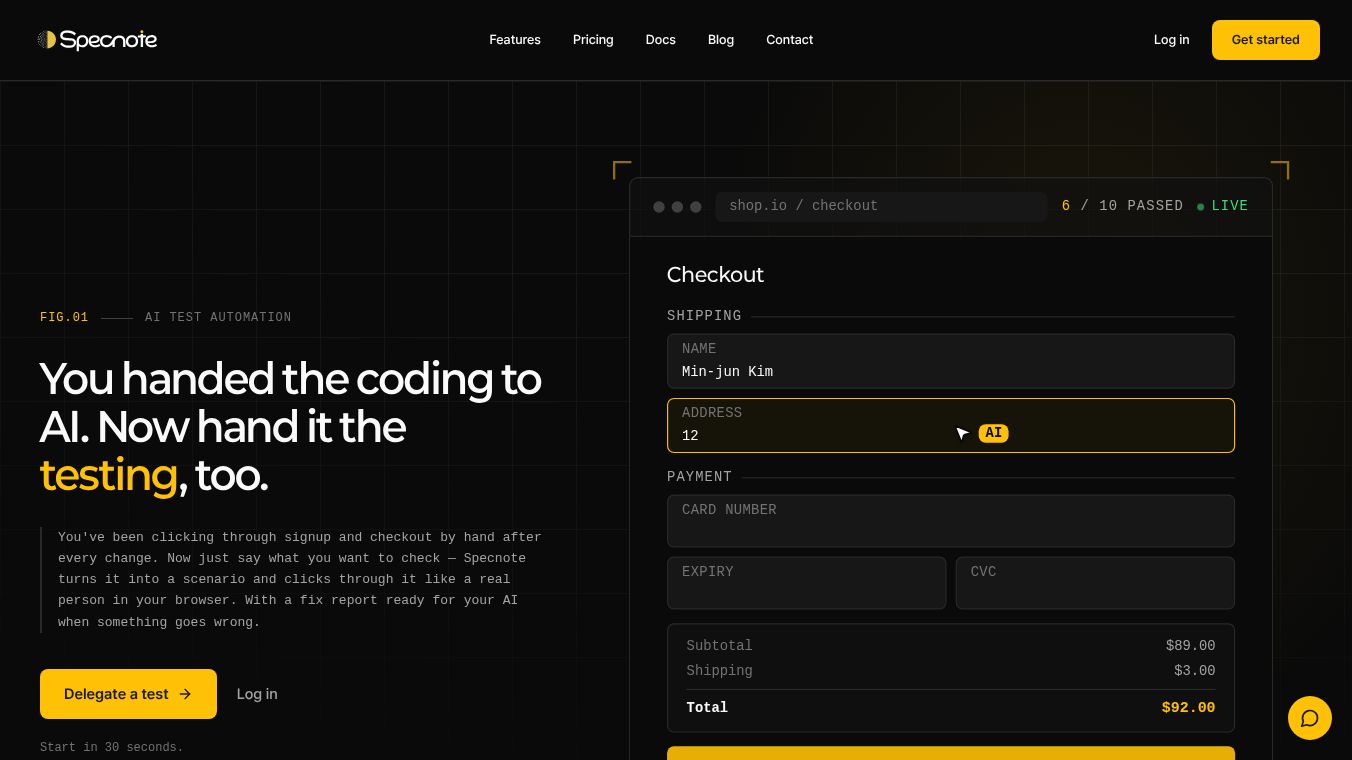





Specnote: Automating AI-Driven Web Testing
Research Context and Background
Specnote is a tool designed to help developers and teams automate the testing of their web applications using artificial intelligence. In the modern software development process, many teams have already started using AI to write code. However, testing often remains a manual task that slows things down. Developers usually have to click through signup, login, and checkout flows by hand after every code change. Specnote solves this problem by allowing developers to tell their AI coding tools to test what they just built. The platform then automatically creates a test scenario, runs it in a real browser, and provides a detailed report if any issues are found.
Benefits
Specnote offers several key advantages that improve the software development workflow:
- Self-Healing Tests: The tool adapts to code changes automatically. If a button moves or text changes on a website, the tests update themselves without needing manual rewrites. This saves time and reduces errors.
- Seamless Integration: Specnote works directly with popular AI coding tools like Cursor, Claude Code, and Codex. It also connects with GitHub and Continuous Integration pipelines. This means tests run automatically whenever code is committed or before a deployment happens.
- Framework Agnostic: It supports a wide range of web technologies including Next.js, React, Vue, Svelte, Astro, Remix, and standard HTML and JavaScript. It is also planning to support mobile frameworks like React Native and Flutter soon.
- Security and Privacy: The tool only has read-only access to code repositories. It also automatically masks sensitive information like passwords and API keys during testing to keep data safe.
- Automated Reporting: If a test fails, Specnote generates a fix report that explains the problem and suggests solutions. Developers can paste this report back into their coding tool to fix the issue quickly.
Use Cases
Specnote is useful for various types of developers and teams:
- Solo Developers: Individuals working alone can use the free plan to run unlimited tests. This helps them catch bugs before customers do, acting like a full team even when working alone.
- Small Teams and Startups: Small groups can use the Standard plan to verify their services daily. Non-technical founders can use the tool to confirm that the website works as planned without needing to read complex code.
- Agencies: Companies managing multiple client projects can run checks on several workspaces every morning to ensure everything is stable.
- Continuous Deployment: Teams can integrate Specnote into their CI/CD pipelines. If a test fails, the deployment stops automatically. This ensures that only approved and bug-free changes are released to production.
Pricing
Specnote offers a flexible pricing model to suit different needs:
- Free Plan: This plan includes unlimited scenarios. Credits are only used when the system actually performs verification. It is ideal for solo developers.
- Standard Plan: Priced at $39 per month, this is the most popular option for individuals and small teams.
- Pro Plan: Priced at $99 per month, this plan is designed for teams that need to verify their applications every day. This plan is coming soon.
Vibes
Users across different stages of their careers have shared positive feedback about Specnote:
- One solo SaaS operator said, "Testing was the thing I always put off. Now I just glance at 'all passed' and move on."
- A startup product owner noted, "I can't read code, but I can now verify myself that our service works the way we planned. That's everything."
- An agency founder mentioned, "We run several client workspaces at once, and every morning they're all checked automatically."
- A non-technical founder added, "When something goes wrong, a fix report comes out — I paste it into Cursor and it's handled. This loop is so smooth."
- An indie maker building with Lovable stated, "Building with Lovable and checking with Specnote — I run things like a team, alone."
- A one-person shop owner said, "I can't go back to customers finding the bugs first. Now I know before they do."
Additional Information
Specnote is built to fit into existing workflows without requiring any installation or manual test code writing. The process involves three simple steps: the user instructs their AI tool to test the feature, the AI agent clicks through the scenario in a real browser, and the results are visualized instantly. Passing tests turn green, while failing tests turn red. The platform aims to complete the entire build-test-fix loop within minutes, allowing developers to focus on building new features rather than debugging old ones.
This content is either user submitted or generated using AI technology (including, but not limited to, Google Gemini API, Llama, Grok, and Mistral), based on automated research and analysis of public data sources from search engines like DuckDuckGo, Google Search, and SearXNG, and directly from the tool's own website and with minimal to no human editing/review. THEJO AI is not affiliated with or endorsed by the AI tools or services mentioned. This is provided for informational and reference purposes only, is not an endorsement or official advice, and may contain inaccuracies or biases. Please verify details with original sources.



Comments
Please log in to post a comment.