Quick Slides
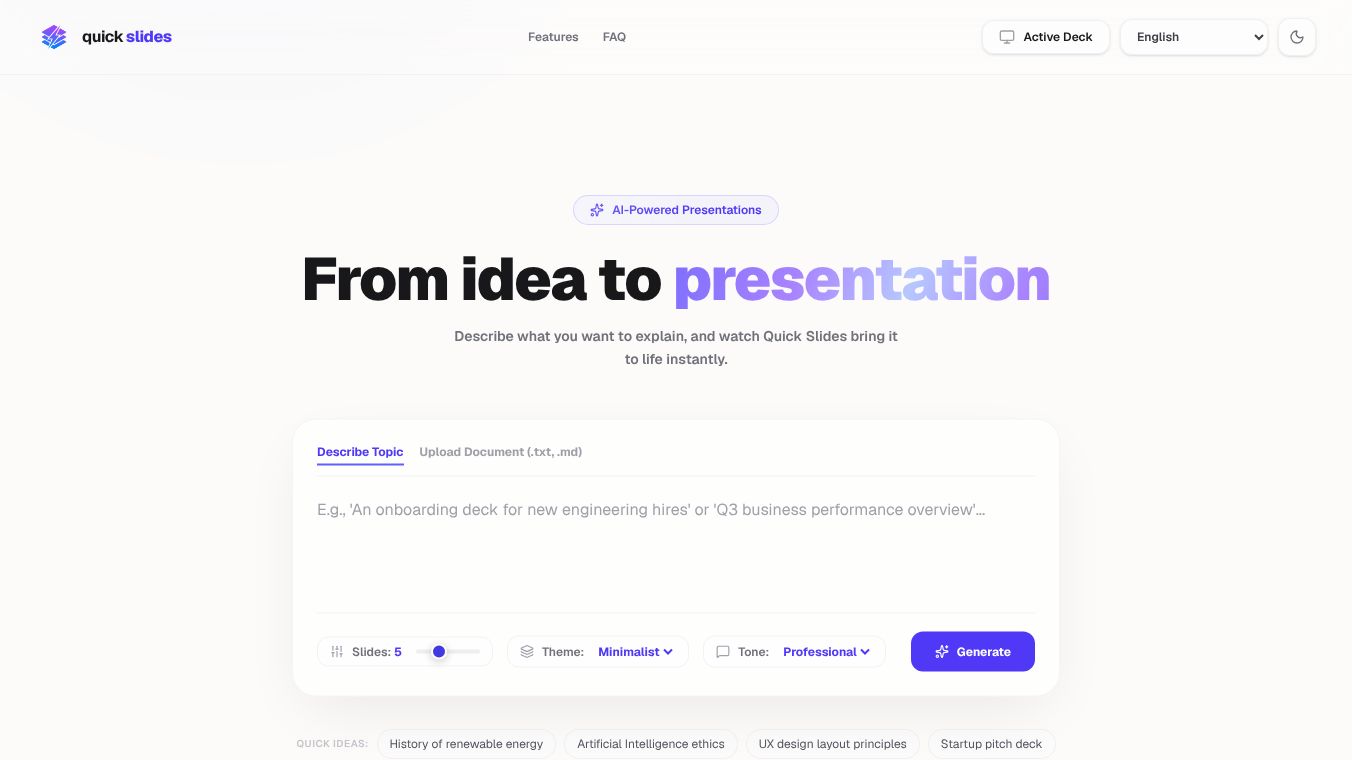





QuickSlides AI: Transforming Presentation Creation with Generative Intelligence
Overview
QuickSlides AI is an innovative platform designed to generate polished presentations instantly from any text input, including meeting notes, LLM outputs, or outlines. By leveraging generative intelligence, the tool aims to eliminate the time-consuming process of slide creation, allowing users to focus on content rather than formatting. The platform has gained traction among top-tier companies such as Y Combinator, Stripe, Vercel, Notion, Linear, Figma, Shopify, Datadog, MongoDB, Cloudflare, Supabase, and GitHub.
Core Value Proposition
The primary benefit of QuickSlides AI is the dramatic reduction in time required to create professional presentations. While traditional tools like PowerPoint can take 45 minutes to produce a deck, QuickSlides can achieve the same result in just 2 minutes, saving up to 98% of the time. This efficiency is achieved through:-Generative Intelligence: Automatically structuring content into logical slides.-Markdown-Native Editing: Allowing users to edit slides using familiar Markdown syntax, supporting code blocks, math, diagrams, and tables.-Zero Formatting Battles: Handling layout, design, and branding automatically.
Workflow Modes
QuickSlides offers three distinct modes to cater to different user needs:1.Creator Mode: Ideal for drafting presentations quickly by pasting text to generate a full draft.2.Editor Mode: Provides a text editor for users who need more control over the content.3.Collab Mode: Enables real-time team collaboration on presentations.4.Present Mode: Offers a speaker mode for delivering presentations with live previews.
Key Features
- AI-Powered Outlining: Users can paste messy notes or AI-generated text to receive a structured outline with clean slide boundaries.
- Instant Markdown to Slides: Supports editing in Markdown syntax, making it easy to iterate and version control presentations.
- Real-Time Collaboration: Teams can edit and review slides together in real-time.
- Tone Selection and Audience Targeting: Customizable options to tailor presentations for specific audiences.
- Custom Branding: One-click export to PPTX, PDF, and HTML formats with consistent branding.
- Speaker Notes: Structured layouts ensure every slide looks intentional and professional.
- No Design Skills Required: The platform handles layout, spacing, and hierarchy automatically.
- Reliable Consistency: Maintains visual consistency even as content changes.
Integrations
QuickSlides seamlessly integrates with popular tools and platforms, including:- PowerPoint- PDF- Google Slides- GitHub- Figma- Notion- Slack
This integration capability ensures that users can incorporate QuickSlides into their existing workflows without lock-in, presenting slides anywhere using the platform's built-in support.
User Testimonials
- Alex Chen, Founder, TechVentures: "QuickSlides cut our pitch-deck turnaround from 2 days to 20 minutes. The investors couldn't believe these weren't designer-made."
- Dr. Maria Santos, Professor, Stanford: "I used to dread making lecture slides. Now I describe the topic and get a beautiful, structured deck in seconds. Game changer for educators."
- Ryan Park, Head of Marketing, ScaleUp: "Our entire marketing team switched to QuickSlides. Consistency across 50+ decks, branded perfectly every time. It's not even close."
- Sarah Kim, Senior Engineer, Stripe: "The Markdown workflow is incredible. I can version control my presentations with Git. Finally, slides that work like code."
- James Mueller, COO, DataViz Agency: "We generate 200+ decks a month for client reports. QuickSlides automates 90% of the work. ROI was positive in the first week."
- Priya Patel, VP Product, Notion: "I was skeptical about AI slides. Then I saw the output quality. These look better than what our design team was producing manually."
Pricing Plans
QuickSlides offers flexible pricing plans to suit various needs:-Starter: Ideal for students, priced at $0/month.-Pro: Designed for professionals, with features tailored for individual use.-Team: Built for organizations, offering advanced collaboration and management tools.
Conclusion
QuickSlides AI represents a significant leap forward in presentation creation, combining the power of AI with user-friendly tools to streamline the workflow for individuals and teams alike. By reducing the time and effort required to create high-quality presentations, QuickSlides empowers users to focus on what truly matters: delivering impactful content.
This content is either user submitted or generated using AI technology (including, but not limited to, Google Gemini API, Llama, Grok, and Mistral), based on automated research and analysis of public data sources from search engines like DuckDuckGo, Google Search, and SearXNG, and directly from the tool's own website and with minimal to no human editing/review. THEJO AI is not affiliated with or endorsed by the AI tools or services mentioned. This is provided for informational and reference purposes only, is not an endorsement or official advice, and may contain inaccuracies or biases. Please verify details with original sources.




Comments
Please log in to post a comment.