QR Menu
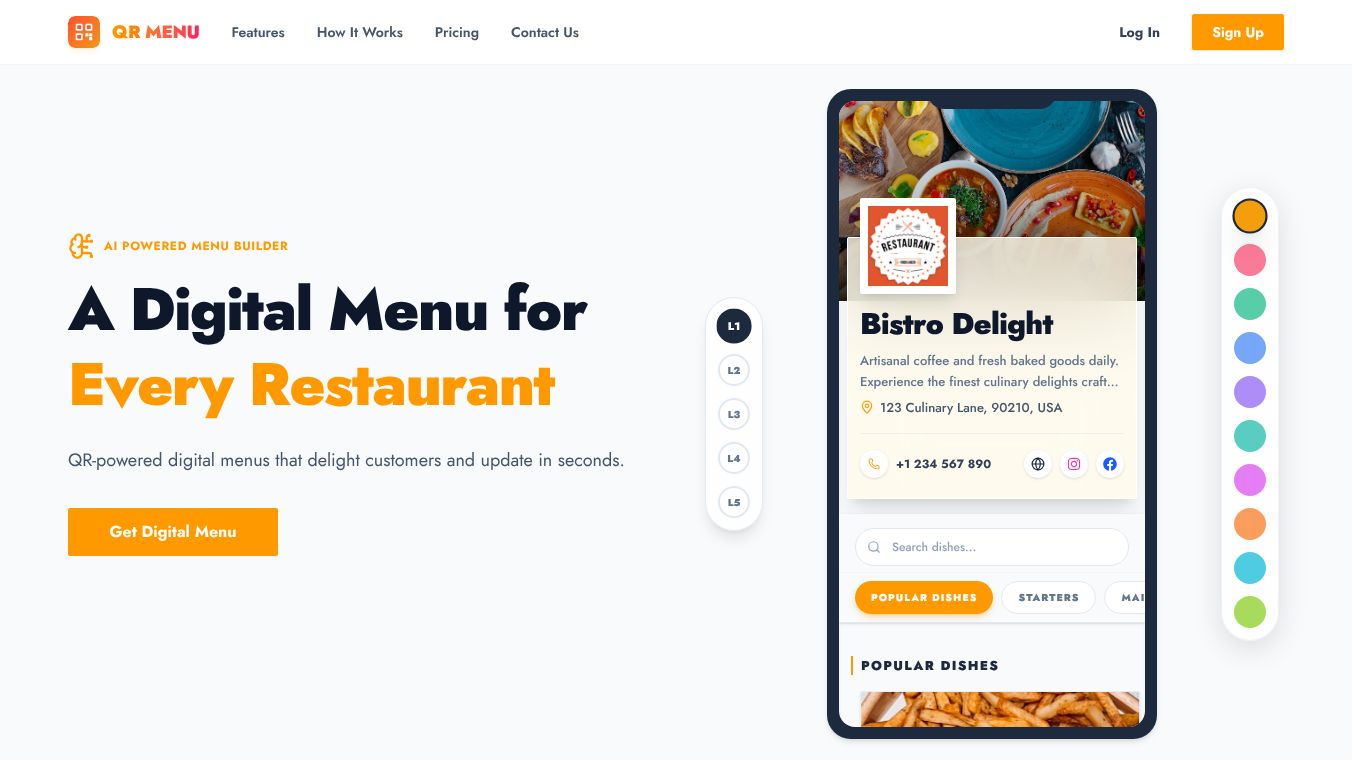





QR Menu: Transforming Dining with Digital Simplicity
Introduction
QR Menu is a digital tool designed to help restaurants replace paper menus with interactive online versions. It uses artificial intelligence to turn photos or PDF files of existing menus into beautiful, mobile-friendly websites in just a few minutes. Customers can access these menus by scanning a simple QR code with their smartphone camera. This service removes the need for restaurants to manually type out their menu items or create complex websites from scratch.
Benefits
QR Menu offers several powerful advantages for restaurant owners and their guests. The most significant benefit is speed. The AI technology can read a physical menu with 99.8% accuracy, saving hours of manual work. Once the digital menu is live, owners can update prices, add new dishes, or remove out-of-stock items instantly. These changes appear immediately for every customer without the need to reprint materials.
Another major advantage is the ability to attract more customers. The platform supports multiple languages and integrates customer reviews, making it easier for diverse groups to find and order food. The digital format also allows for high-quality photos and smart layouts that make dishes look more appealing, which can encourage customers to order higher-value items. Additionally, the system provides an analytics dashboard. This lets owners track how many people scan the code, which dishes are most popular, and how long customers spend looking at the menu.
Use Cases
This tool is perfect for any restaurant that wants to modernize its ordering process. It works well for cafes, bistros, fine dining establishments, and food trucks. A common use case is replacing printed table tents. Instead of handing out paper menus, staff can place a small card with a QR code on each table. Guests simply scan the code to view the full menu on their own devices.
The service is also ideal for restaurants that need to adapt quickly. For example, if a restaurant changes its hours or adds a seasonal special, the owner can update the digital menu in seconds. This ensures that every customer sees the most current information. The platform also supports groups of restaurants, allowing a brand with multiple locations to manage all their menus from one place. Since no app download is required, it works seamlessly for customers who prefer using their existing web browsers.
Pricing
The service offers a flexible pricing model with a 7-day free trial. No credit card is needed to start the trial or to upload menus and generate QR codes. Users can cancel their subscription at any time.
The Premium plan costs $5.99 per month. This option is best for individual restaurants. It includes one restaurant QR menu, unlimited menu items, unlimited scans, and access to AI transcription and advanced analytics.
The Premium Plus plan costs $19.99 per month. This tier is designed for growing brands that manage multiple locations. It includes everything in the Premium plan plus the ability to manage up to five restaurant menus. It also adds a feature to highlight special dishes and provides priority customer support.
Vibes
While specific customer testimonials are not detailed in the available information, the platform is built with user experience in mind. The design focuses on ensuring that menus load instantly on any device without lag or pinching issues. The interface is clean and easy to navigate, which helps reduce frustration for customers. The inclusion of features like customer wishlists and social media integration suggests a focus on building a positive connection between the restaurant and its diners. The emphasis on a frictionless experience indicates that the product aims to be a reliable and smooth addition to any dining operation.
Additional Information
CreateQRMenu is part of a broader effort to digitize the dining experience. The company has developed a robust suite of tools that go beyond simple menu display. They provide high-resolution print assets, allowing restaurants to download vector files for creating custom table tents, flyers, or stickers. The support team is available via email and typically responds within a few hours to help resolve any issues. The platform supports various file formats for upload, including PDF, JPG, and PNG, making it accessible for users with different types of existing menu files.
This content is either user submitted or generated using AI technology (including, but not limited to, Google Gemini API, Llama, Grok, and Mistral), based on automated research and analysis of public data sources from search engines like DuckDuckGo, Google Search, and SearXNG, and directly from the tool's own website and with minimal to no human editing/review. THEJO AI is not affiliated with or endorsed by the AI tools or services mentioned. This is provided for informational and reference purposes only, is not an endorsement or official advice, and may contain inaccuracies or biases. Please verify details with original sources.


Comments
Please log in to post a comment.