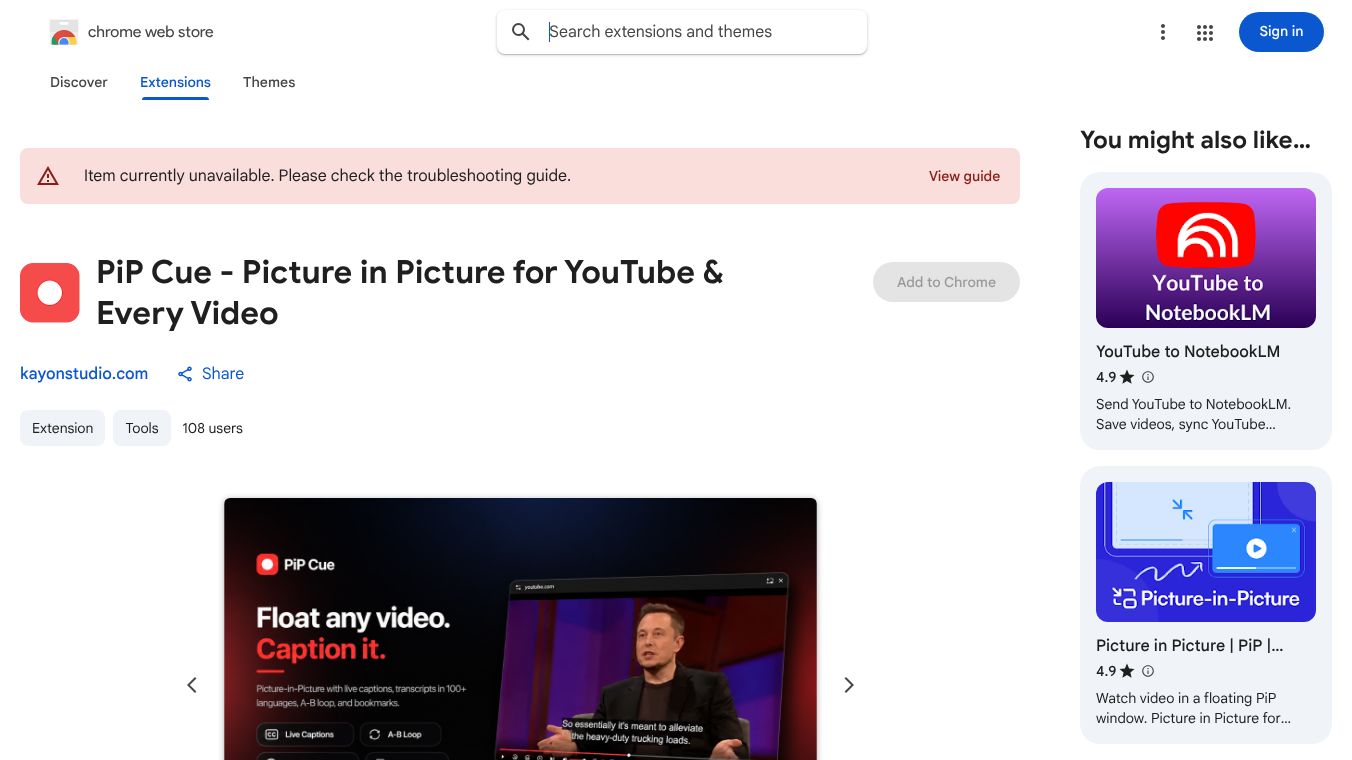





Pip Cue is a browser extension designed for people who use YouTube to learn new skills. Instead of just watching videos for fun, users can use this tool to study lectures, watch tutorials, or follow along with complex instructions while doing other tasks. The main goal is to give learners full control over video playback and text content without leaving their current workspace.
Benefits
Pip Cue offers several powerful features that make learning easier and more efficient. It provides three different picture-in-picture modes that users can switch between with a single key press. The standard mode creates a simple floating window for general viewing. The cinematic mode offers advanced controls like playback speed adjustment and the ability to loop specific sections of a video. This is helpful for mastering difficult parts like dance moves or code segments. There is also a captions-only mode that shows just the subtitles, which is great for podcasts or lectures where the video is secondary. The extension includes a clean sidebar that displays the full transcript of the video. Users can click any line of text to jump directly to that moment in the video. They can also translate the entire script into over 100 languages with a single tap. The panel automatically scrolls to keep the current speaker in view. Another major benefit is the ability to save and resume videos anywhere. Users can bookmark a video at the exact second they stopped watching, and the tool remembers this location. They can set reminders to return to a saved video later. The tool integrates with NotebookLM, a research tool, allowing users to export video links directly into a notebook for analysis. Finally, the extension prioritizes privacy. By default, all bookmarks stay in the user's browser and transcripts are never uploaded to any server. There are no analytics or trackers inside the extension.
Use Cases
This tool is perfect for students, professionals, and self-learners who want to study from YouTube videos. It works well when someone needs to watch a tutorial while working on a project or studying for an exam. For example, a musician can use the loop feature to practice a difficult chord change repeatedly. A programmer can speed up a coding tutorial to understand complex concepts faster. A language learner can use the translation feature to understand foreign phrases in real time. The save and resume feature is useful for long lectures or interviews where it is easy to lose track of the content. Users can pause a video, go do something else, and return to the exact same spot later without having to search for it again. The integration with NotebookLM makes it ideal for researchers who want to turn video content into searchable notes for their projects.
Pricing
Pip Cue is currently free to use. Every feature listed above, including all three PiP modes, transcript translation, and the save system, is available in the free version. There is a Pro version coming soon, but users can install the extension today and try it on their next video without any cost.
Vibes
Users who have tried Pip Cue generally appreciate its focus on productivity and learning. The ability to translate transcripts instantly is a huge plus for non-native speakers. The cinematic mode with A-B looping is praised by people who need to practice specific parts of a video repeatedly. The clean design of the transcript sidebar is well-received because it does not clutter the screen. Many users value the privacy aspect, knowing that their data stays on their device unless they choose to sync it with Google. The free nature of the tool is also a major positive, as it removes financial barriers for students and hobbyists.
Additional Information
Pip Cue was created to bridge the gap between video consumption and research. It was designed with the specific audience of learners in mind, distinguishing itself from other PiP tools that focus on entertainment. The development team has chosen a privacy-first approach from the start, ensuring that transcripts are never uploaded and no trackers are used. The extension is available on the Chrome Web Store and works with YouTube. While a Pro version is in the works, the current free version covers all the core functionality needed for serious learning.
This content is either user submitted or generated using AI technology (including, but not limited to, Google Gemini API, Llama, Grok, and Mistral), based on automated research and analysis of public data sources from search engines like DuckDuckGo, Google Search, and SearXNG, and directly from the tool's own website and with minimal to no human editing/review. THEJO AI is not affiliated with or endorsed by the AI tools or services mentioned. This is provided for informational and reference purposes only, is not an endorsement or official advice, and may contain inaccuracies or biases. Please verify details with original sources.





Comments
Please log in to post a comment.