P Video AI Video Generator





P Video: A Comprehensive Guide to Browser-Based AI Short Video Creation
Overview
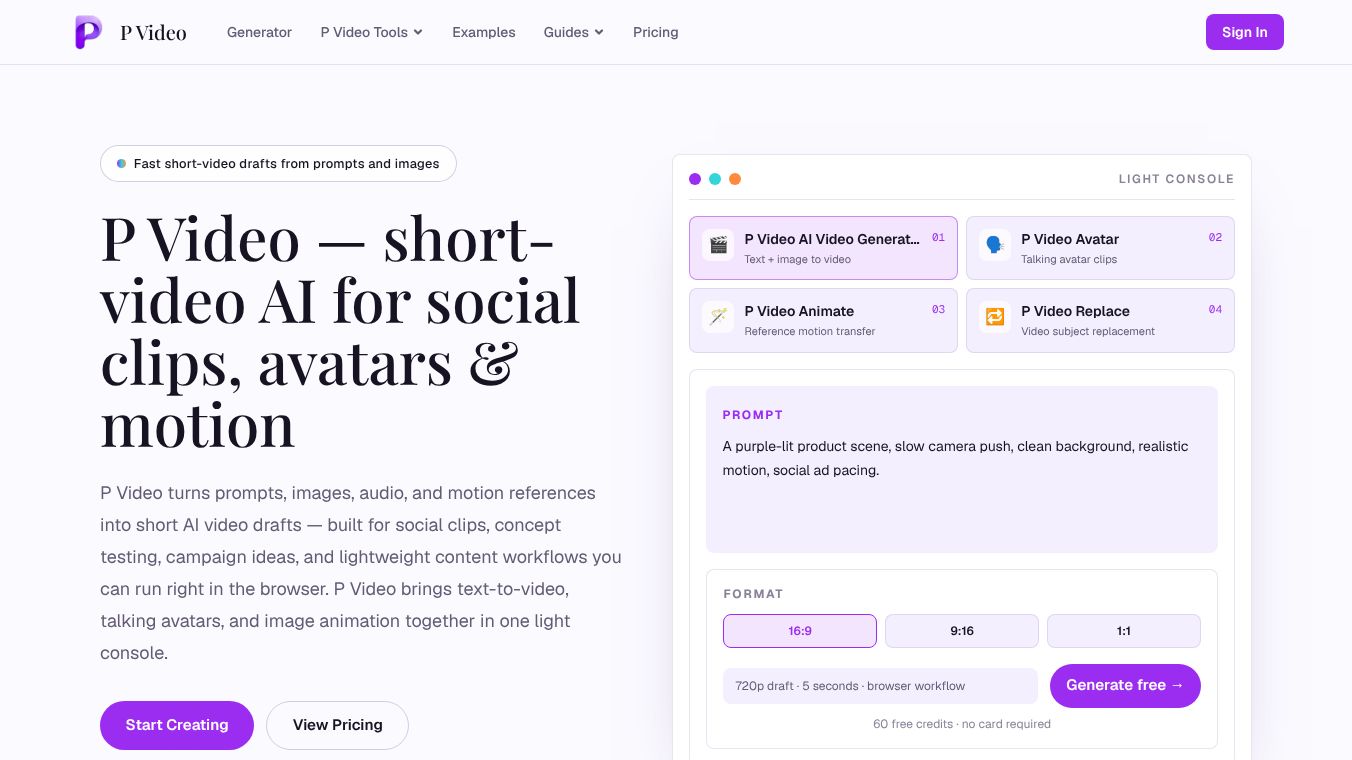
P Video is an independent, browser-based AI video generator designed specifically for creating short-form content. It consolidates text-to-video, image-to-video, talking avatars, image animation, and video replacement workflows into a single, lightweight console. Unlike traditional video editing software, P Video is built for the "moment before production," allowing users to quickly draft, preview, and iterate on ideas without the need for local installations, GPU setups, or complex timelines.
Core Capabilities
P Video offers four distinct creation modes, all accessible through a unified interface:
- AI Video Generator: Users can describe a scene in plain language or start from a reference image to generate short clips. This mode supports controls for aspect ratio, duration, and resolution, making it ideal for moving ideas from a sentence to a watchable draft.
- Avatar: This tool pairs a portrait image with audio to create talking-avatar videos. It is optimized for social updates, product demos, and lightweight presenter drafts, eliminating the need to book a shoot.
- Animate: Designed to bring still images to life using reference-driven motion. This mode helps users test how a fixed subject moves, paces, and frames before committing to a longer production pass.
- Replace: Allows users to start with a source video and guide a subject replacement using 1-3 reference images. This is particularly useful for fast product swaps, campaign variations, and controlled motion tests.
Ideal Use Cases
P Video is tuned for lightweight workflows where speed and iteration are prioritized over final polish. Key use cases include:*Social-Ready Short Clips: Generating vertical and widescreen drafts sized for feeds, stories, and reels to judge pacing and framing in the actual format.*Concept and Pitch Videos: Creating quick moving visuals to communicate directions in decks, chat threads, or review calls more effectively than static boards.*Motion and Format Tests: Comparing camera movement, subject behavior, and aspect ratios across multiple takes before selecting one for a full edit.*Avatar and Presenter Drafts: Assembling lightweight talking-style clips for announcements and explainers.
Workflow and Settings
The P Video workflow is streamlined into four steps:1.Brief the Shot: Describe the subject, setting, camera movement, lighting, mood, and required motion stability. Specificity reduces retries.2.Choose Input: Select the appropriate input based on the mode (text, reference image, portrait + audio, motion reference, or source video + replacement images).3.Set Format: Choose the aspect ratio (widescreen or vertical) and resolution. Users can generate at 720p for fast iteration and switch to 1080p for higher-quality drafts once the direction is locked.4.Review and Iterate: Preview the clip, keep successful takes, and refine prompts for subsequent versions. All generated works are saved to the user's library for comparison.
Technical Specifications
- Platform: Runs entirely in the browser; no local model download or GPU setup is required.
- Resolutions: Supports 720p and 1080p output.
- Aspect Ratios: Supports widescreen (e.g., 16:9) and vertical (e.g., 9:16) and square (1:1) formats.
- Pricing Model: Generation is billed by the second of output. Rates vary by workflow and resolution.
- Storage: Generated videos are retained in the user's library for 6 months.
Account and Pricing
- Free Trial: New accounts receive 60 free signup credits upon registration.
- Expiration: Free credits do not expire.
- Access: No credit card is required to start using the free credits.
- Expansion: Users can purchase additional credit packs to scale their generation needs.
Usage Policies
P Video adheres to strict content guidelines. The platform prohibits NSFW, adult, exploitative, unlawful, and rights-infringing content. Users must hold the rights to any image, audio, or likeness they upload to the system.
Conclusion
P Video serves as a powerful tool for teams and individuals looking to visualize concepts rapidly. By offering a product-first, browser-based experience that combines multiple AI video generation techniques, it enables users to test ideas, pitch motion, and refine social formats efficiently before investing time in heavy editing timelines.
This content is either user submitted or generated using AI technology (including, but not limited to, Google Gemini API, Llama, Grok, and Mistral), based on automated research and analysis of public data sources from search engines like DuckDuckGo, Google Search, and SearXNG, and directly from the tool's own website and with minimal to no human editing/review. THEJO AI is not affiliated with or endorsed by the AI tools or services mentioned. This is provided for informational and reference purposes only, is not an endorsement or official advice, and may contain inaccuracies or biases. Please verify details with original sources.



Comments
Please log in to post a comment.