Nimuvo — AI Safety Layer for macOS





Nimuvo: Secure Coding Agents with Local Policy Enforcement
Introduction
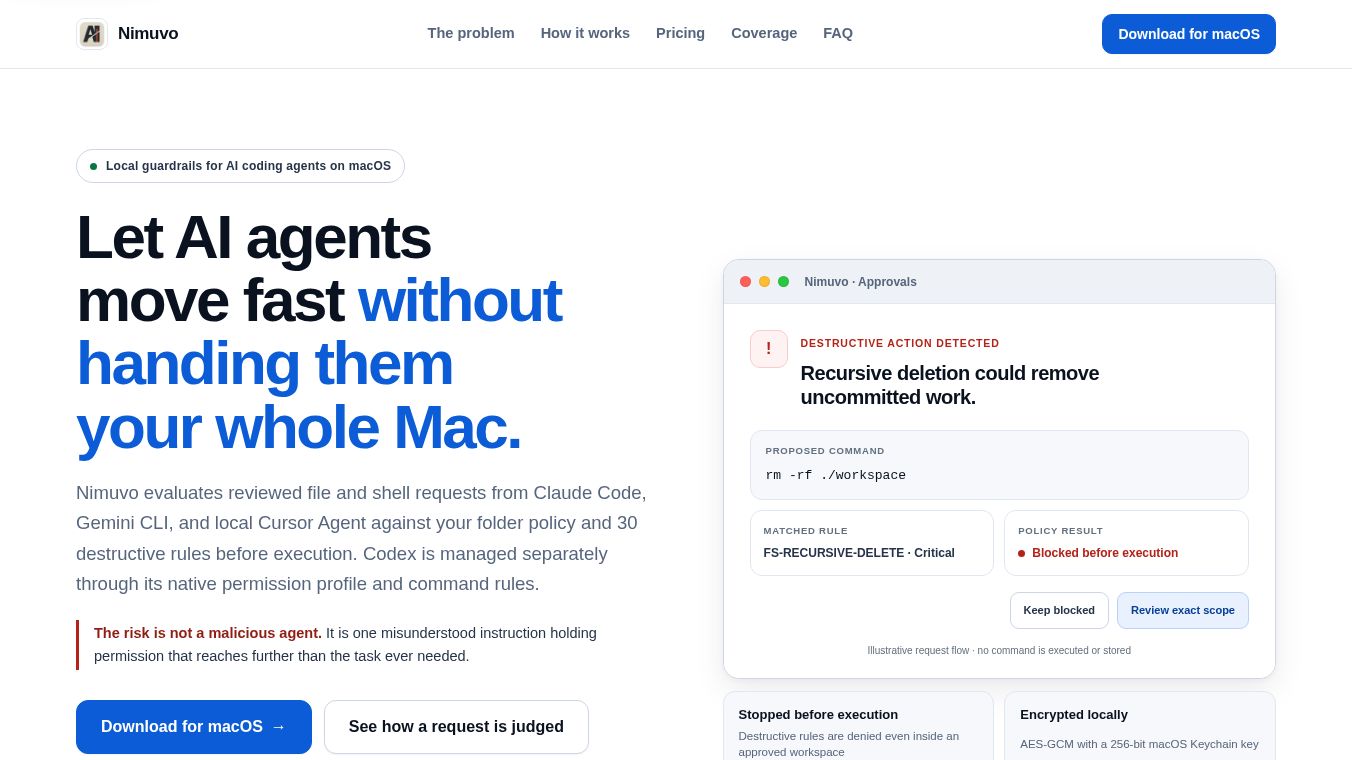
Nimuvo is a security tool designed for Mac users who work with AI coding agents. These agents, such as Claude Code, Gemini CLI, and Cursor Agent, help developers write code but are given access to the computer to do so. This access can be dangerous if the AI makes a mistake or follows a wrong instruction. Nimuvo acts as a safety layer that checks every request from these agents before it runs. It ensures that powerful commands cannot accidentally delete important files, wipe databases, or destroy cloud resources. The tool works entirely on the user's Mac without sending data to external servers.
Benefits
Nimuvo offers several key advantages for developers who want to use AI safely.
- Prevents Accidental Data Loss:The tool blocks dangerous commands like recursive file deletion, forced Git resets, and database drops. It stops a single typo or a misunderstood instruction from causing permanent damage.
- Local-First Privacy:All security checks, activity history, and encryption keys stay on the user's Mac. No information is sent to outside servers, ensuring complete data privacy.
- No Account Required:Users can use the core protection features without creating an account. An account is only needed for paid features or if a license needs to be recovered.
- Free for Personal Use:The Community Free plan provides every personal feature, including all supported agent controls and local policies.
- Granular Control:Users can set specific rules for different folders. They can also approve actions for short time periods or for a single session, giving them full control over what the AI can do.
Use Cases
Nimuvo is designed for developers who integrate AI coding agents into their daily workflow. It is useful in the following scenarios:
- Protecting Sensitive Projects:Developers can mark private folders as protected. Even if an AI agent has permission to access a main project folder, it cannot enter or modify these protected areas.
- Safe Cloud Operations:The tool prevents AI agents from running commands that could delete resources on AWS, Google Cloud, or Azure. It blocks destructive actions like removing S3 buckets or terminating cloud instances.
- Version Control Safety:Nimuvo stops AI from running commands that could erase Git history or force push changes to a repository. This protects the team's code history from accidental wipes.
- Database Protection:It blocks commands that could drop tables or truncate databases. This ensures that development or production data remains safe even when an AI is trying to fix a bug.
- Testing Commands:Users can use the safety simulator to test a command before the AI sees it. This shows what the command would do and its potential risk without actually running it.
Pricing
Nimuvo offers a free plan called the Community Free plan. This plan unlocks every personal feature, including all supported agent controls, approvals, and local policy rules. There is no cost for the core protection needed for personal use.
Vibes
Nimuvo is designed to solve a real and growing problem in the developer community. As AI coding agents become more common, the risk of accidental data loss increases. The tool addresses this by providing a strict guardrail that allows developers to move fast without handing over unrestricted access to their machines. The emphasis on local-first protection and the lack of required accounts make it appealing to privacy-conscious users. The tool is seen as a necessary addition for anyone using powerful AI agents that have shell access to their Mac.
Additional Information
Nimuvo is built with strong technical standards to ensure reliability and security. The app is signed by Apple and notarized, which means it has passed Apple's security checks. Updates are verified using EdDSA signatures to ensure they come from the official source. The software requires macOS 14 or later to run. All sensitive data is encrypted using AES-GCM with a 256-bit key stored in the macOS Keychain. The application stores its data locally in the user's Library folder and does not send any activity telemetry to external servers.
This content is either user submitted or generated using AI technology (including, but not limited to, Google Gemini API, Llama, Grok, and Mistral), based on automated research and analysis of public data sources from search engines like DuckDuckGo, Google Search, and SearXNG, and directly from the tool's own website and with minimal to no human editing/review. THEJO AI is not affiliated with or endorsed by the AI tools or services mentioned. This is provided for informational and reference purposes only, is not an endorsement or official advice, and may contain inaccuracies or biases. Please verify details with original sources.



Comments
Please log in to post a comment.