




My Virtual World: Build a Living Digital Environment for AI Teams
Overview
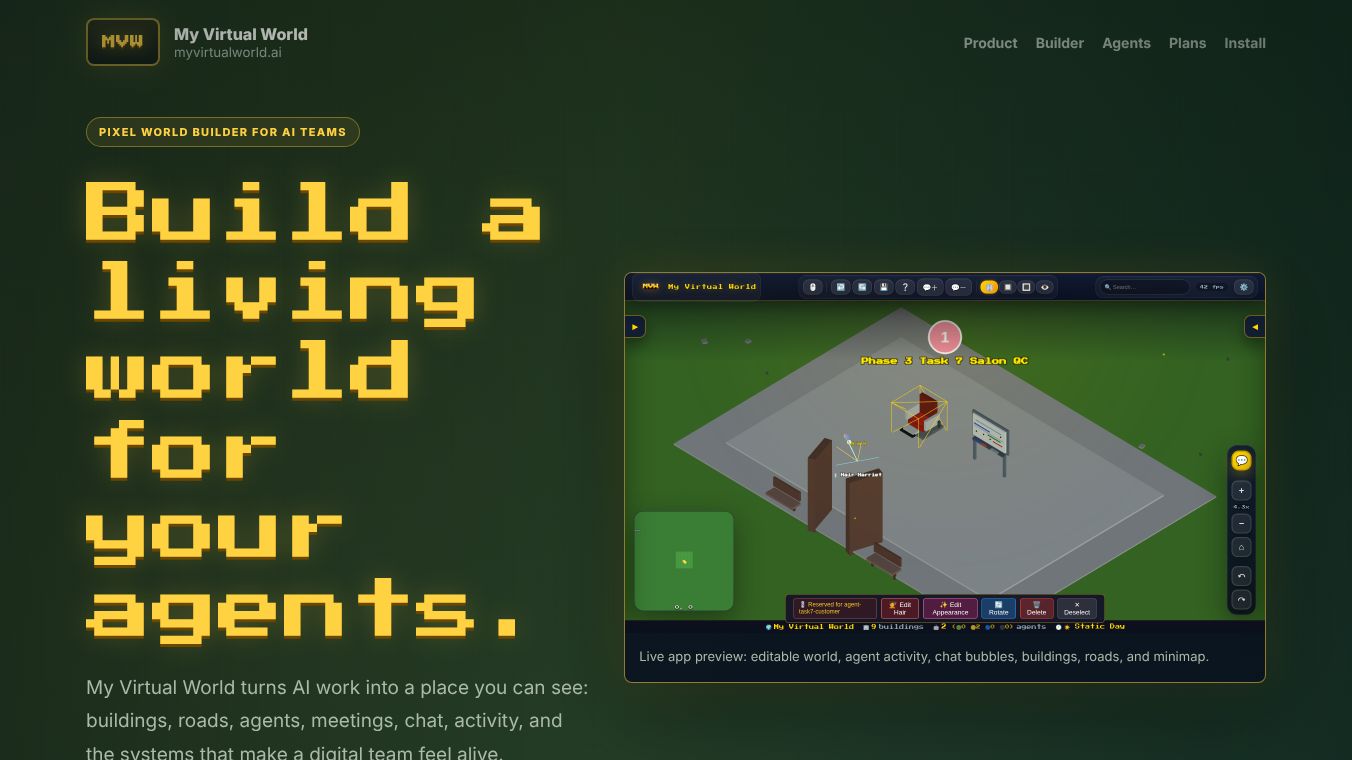
My Virtual World is a pixel-based world builder designed specifically for AI teams. It transforms abstract AI work into a tangible, visible environment where buildings, roads, agents, meetings, and chat interactions take place. Unlike traditional dashboards that hide work behind logs and status chips, My Virtual World provides a visible place for every agent, building, and workflow, allowing users to zoom out to understand the state of the world and zoom in to tune specific details.
Benefits
The platform offers several key advantages for managing complex AI systems. First, it provides a comprehensive suite of tools to design and edit a digital city while it runs. Users can shape terrain, lay down roads, create offices and parks, and place furniture without leaving the main canvas. Second, the application makes agent behavior easy to understand. Teams can watch characters move, chat, meet, and work in real time. Features like chat bubbles, status indicators, and movement tracking help users see exactly what is happening. Third, the interface is responsive and works well on both desktop and mobile devices. Important controls like the minimap and search tools remain reachable on smaller screens, ensuring users can inspect activity quickly from anywhere.
Use Cases
My Virtual World is ideal for teams that need to visualize and manage AI agents in a structured environment. It allows users to design a digital city that reflects how their team actually works. For example, a project manager can create a map with specific zones for different tasks and then watch agents move between them. The tool supports debugging and editing agents from a single visual surface, which saves time compared to jumping through multiple panels. It is also useful for teams that want to experiment with different world themes or share neighborhood templates with others. The self-hosted nature of the software makes it suitable for organizations that prefer to keep their data and infrastructure in-house.
Pricing
My Virtual World offers a free demo and a paid full build option. The free demo costs nothing and includes a starter world template, basic agents, and world visualization. It also provides a chat and activity preview along with community support. The Early Bird Full Build is available for a one-time purchase of $19.99. This price will increase to $59.99 in the future. The full build includes unlimited agents, buildings, and districts. It also features a full 3D world builder, roads, interiors, and furniture. Users get access to agent movement, meetings, and chat features. The full version removes the demo watermark and includes support for OpenClaw gateway and Hermes. A license key is sent via email after purchase and can be activated through the setup wizard.
Vibes
The tool has received positive attention for its unique approach to visualizing AI team dynamics. Users appreciate the ability to see a living, editable world where agents interact within a structured environment. The platform provides the necessary infrastructure to make digital teams feel alive and responsive. Early adopters have found the self-hosted model appealing because it gives them full control over their installation. The clear distinction between the free demo and the full build allows teams to test the concept before committing to a purchase.
Additional Information
Future developments for My Virtual World include more world themes and biome packs. The roadmap also lists premium building and character packs as upcoming features. The team plans to add deeper integrations with OpenClaw and Hermes. New features will include agent-to-agent routines and social activity. More object interactions, jobs, and world events are also in the works. The developers are working on neighborhood templates and world sharing capabilities to enhance collaboration. The software is self-hosted and can be installed in minutes using Docker. Users need Docker installed and access to the public GitHub repository to get started. Updates are managed via the GitHub source, and the license key remains saved after restarts and rebuilds.
This content is either user submitted or generated using AI technology (including, but not limited to, Google Gemini API, Llama, Grok, and Mistral), based on automated research and analysis of public data sources from search engines like DuckDuckGo, Google Search, and SearXNG, and directly from the tool's own website and with minimal to no human editing/review. THEJO AI is not affiliated with or endorsed by the AI tools or services mentioned. This is provided for informational and reference purposes only, is not an endorsement or official advice, and may contain inaccuracies or biases. Please verify details with original sources.





Comments
Please log in to post a comment.