Movcut
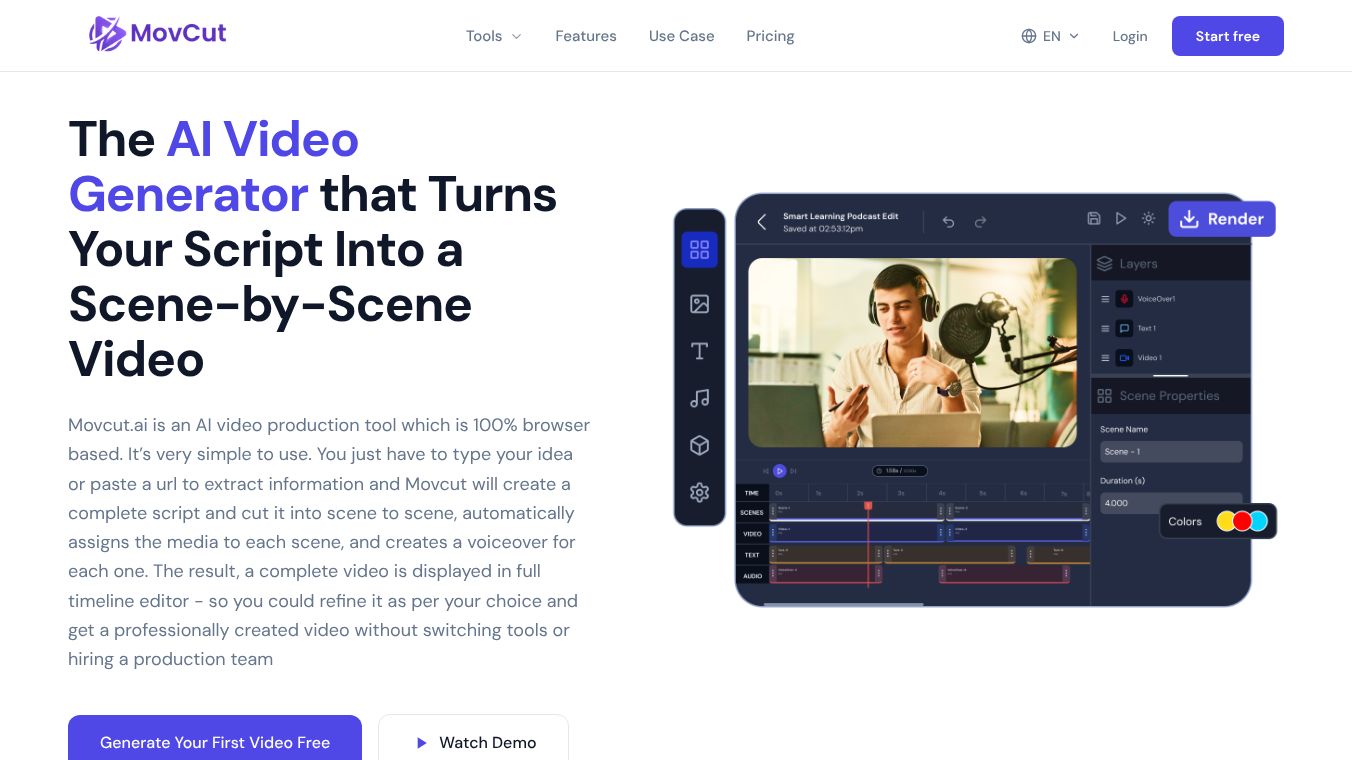





Movcut.ai: The Comprehensive AI Script-to-Video Platform
Overview
Movcut.ai is a 100% browser-based AI video production tool designed to transform scripts, text prompts, or web content into complete, scene-by-scene videos. It eliminates the need for separate production tools or hiring a team by integrating script generation, media assignment, voiceover creation, and timeline editing into a single workflow. The platform is free to start with no credit card required and offers a free plan forever.
Core Workflow: From Idea to Final Video
The platform operates through a streamlined 5-step process:
- Input Your Script: Users can generate a script via a text prompt (idea), paste a URL (to extract and structure existing content), or manually type a custom script. The Script Writer organizes content into essential components: Hook, Body, and Call to Action (CTA).
- Review and Edit Scene Script: Users review the generated scene-by-scene script, adjusting text and duration for each scene. They then select a template to define the video's visual structure.
- Select Media: Movcut.ai automatically matches stock footage to each scene. Users can replace media by searching the stock library, generating AI images/videos via text prompt, or uploading their own files. Duration is displayed to ensure precise timing.
- Choose Voiceover and Captions: Users select a voice provider (OpenAI or ElevenLabs) with over 100 voice options in 50+ languages. Caption styles (Modern, Minimal, Bold) can be chosen. If narration is not needed, the "No Voice" option bypasses it entirely.
- Review, Edit, and Export: Users preview the sequence and click "Create Project" to open the Timeline Editor. Here, they can refine scenes, media, text, and audio before exporting in HD, Full HD, or 4K.
Key Features and Capabilities
Scene-Level Control
Unlike competitors that offer global settings, Movcut.ai provides director-level control at the scene level. Every scene is a self-contained production unit where users can independently modify:* Script text* Media assets* Voiceover (per scene)* Duration* Visual settings
This allows users to swap media or adjust timing for one scene without affecting the rest of the project.
Integrated AI Tools
- AI Media Library: Access to stock footage, user-uploaded media, and AI-generated images/videos from text prompts within a single panel.
- AI Voiceover: Text-to-speech narration powered by OpenAI and ElevenLabs, with per-scene synchronization.
- Timeline Editor: A full-featured editor with four layers per scene (Scenes, Video, Text, Audio). Users can add scenes, adjust lengths, add background music, and manipulate media properties (position, opacity, rotation, crop).
- Subtitles: Automatically generated, multilingual, and time-synced captions available in 50+ languages.
- Template Library: Pre-built layouts for various video types (marketing, educational, social media) that define structural flow and pacing.
Technical Specifications
- Resolution: HD, Full HD, or 4K.
- Aspect Ratios: 16:9 (Landscape), 9:16 (Portrait/Vertical), 1:1 (Square), 4:5.
- Duration: Total video length from 15 seconds to 10 minutes; individual scene clips from 3 to 30 seconds.
- File Formats: MP4, MOV, WebM, WMV, MKV.
- Frame Rates: 24fps, 30fps, 60fps.
- Languages: 50+ supported languages for voiceover and subtitles.
- AI Models: Powered by OpenAI (GPT Image 1) and ElevenLabs.
Use Cases
Movcut.ai is built for a diverse range of creators and businesses:
- Marketing & Ads: Creating promotional videos, brand content, and ad creatives optimized for YouTube, LinkedIn, and Meta with clear Hook-Body-CTA structures.
- Social Media: Generating short-form content for TikTok, Instagram Reels, and YouTube Shorts (9:16 format) optimized for engagement and silent autoplay.
- Education: Transforming lessons and outlines into instructional videos up to 10 minutes long, compatible with Learning Management Systems.
- Product Demos: E-commerce sellers can generate walkthroughs using product images or descriptions for platforms like Shopify and Amazon.
- Corporate Training: Converting internal documentation and onboarding guides into structured training videos compatible with Microsoft Teams and Notion.
- Faceless YouTube: Creating long-form content without on-camera presenters using AI narration and generated visuals.
- Explainer Videos: SaaS founders and startups can introduce products using the Hook-Body-CTA script structure.
- Agency Production: Scaling client video production efficiently using scene-level editing to tailor individual scenes to client briefs.
Pricing and Plans
Movcut.ai offers a tiered pricing structure:
- Free Plan: Forever free. Includes 10 credits, 8 AI videos (10s), 2 Script-to-Video projects (120s), 12 AI images, 50 scripts, HD export (720p), 8 voices, watermark-free, and commercial license.
- Starter Monthly ($23/mo): 180 credits. Includes Full HD (1080p), 50 voices, 54 Script-to-Video projects, 91 AI images, 820 scripts, and advanced features.
- Starter Yearly ($163/yr): 2,160 credits. Includes Full HD (1080p), 100+ voices, 388 Script-to-Video projects, 646 AI images, 5,820 scripts, and priority queue.
Security and Accessibility
- Security: All uploads and projects are kept in private user accounts. Content is not shared with third parties.
- Accessibility: As a web-based application, it requires no software download and works on any device with a modern browser, though the full timeline editor is optimized for desktop.
- Commercial Use: Paid plans include a commercial license for ads, client deliverables, and monetized channels.
Conclusion
Movcut.ai distinguishes itself as the only script-to-video platform that grants users control over all four production layers (media, voiceover, duration, and captions) simultaneously at the scene level. By combining script generation, AI media matching, and a robust timeline editor, it enables creators to produce professional videos directly from text without the complexity of traditional video production workflows.
This content is either user submitted or generated using AI technology (including, but not limited to, Google Gemini API, Llama, Grok, and Mistral), based on automated research and analysis of public data sources from search engines like DuckDuckGo, Google Search, and SearXNG, and directly from the tool's own website and with minimal to no human editing/review. THEJO AI is not affiliated with or endorsed by the AI tools or services mentioned. This is provided for informational and reference purposes only, is not an endorsement or official advice, and may contain inaccuracies or biases. Please verify details with original sources.

Comments
Please log in to post a comment.