MacSIM by Studio Practice
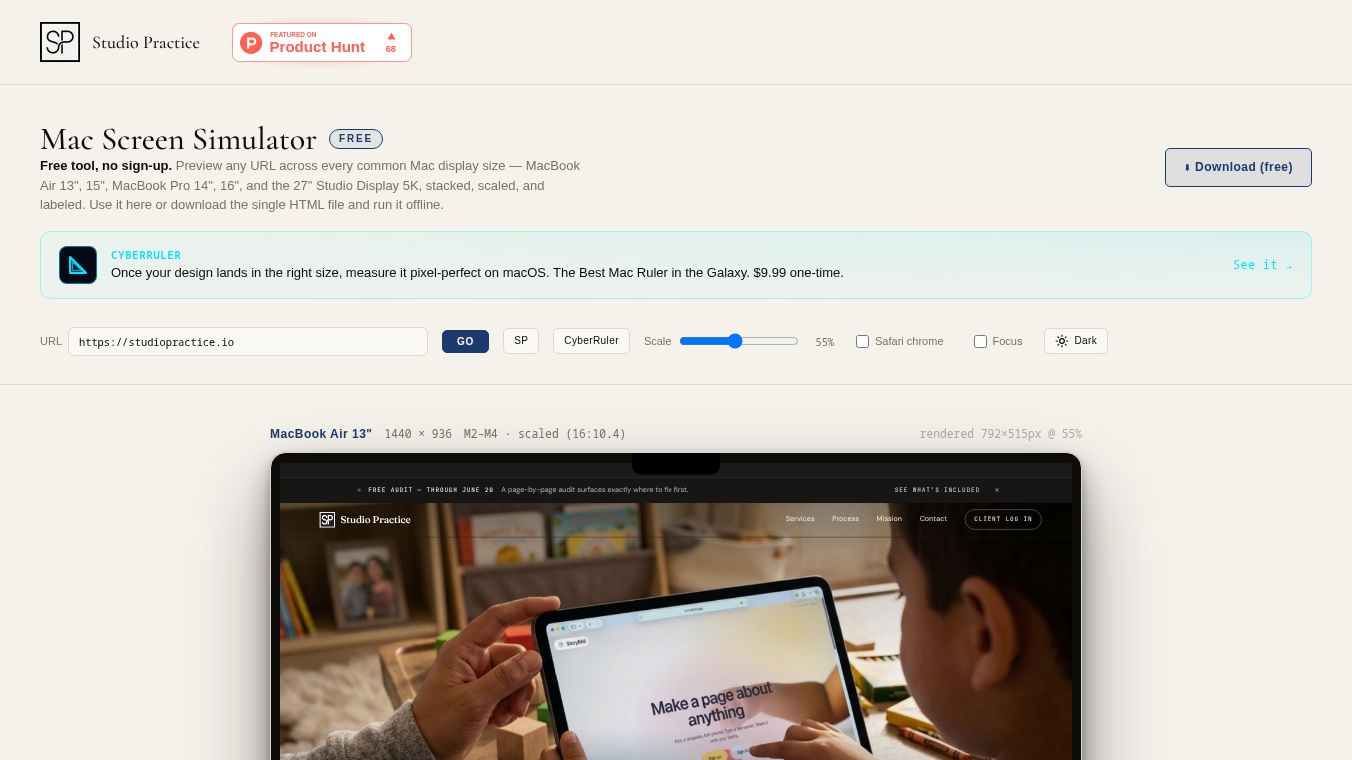





MacSIM by Studio Practice: A Comprehensive Guide to Offline Mac Screen Simulation
MacSIM is a free tool created by Studio Practice that lets users test websites on different Apple Mac computers without needing to buy new hardware. It works directly in your web browser and allows you to see how a website looks on six common Mac screen sizes at the same time. This tool is designed for people who build websites or design user interfaces to ensure their work looks perfect on Mac devices.
Benefits
MacSIM offers several important advantages for web developers and designers. First, it is completely free and requires no sign-up or account creation. Second, it works offline because it is a single file that you can download and run forever without an internet connection. Third, it provides pixel-accurate views of six specific Mac models including the MacBook Air 13 inch, MacBook Air 15 inch, MacBook Pro 14 inch, MacBook Pro 16 inch, iMac 24 inch, and the Studio Display 5K. The tool also includes a fake menu bar and notch to make the preview look exactly like a real Mac computer. This helps users check their designs for layout issues and check how text and images scale on different screen sizes.
Use Cases
This tool is useful for freelance web designers, startup engineers, and digital agencies who need to verify their work on Mac screens. You can use MacSIM to preview your local development server while you are coding. It is also great for creating marketing screenshots that show your website on multiple devices at once. Designers can use it to check if their CSS styles break on specific Mac resolutions before showing the project to a client. Because it runs locally, it is perfect for teams that want to keep their testing private and secure without sharing data with third-party services.
Pricing (ONLY include if available)
MacSIM is free to use. There are no hidden fees, subscription costs, or limited features. Users can download the tool once and use it as many times as they want.
Vibes (ONLY include if available)
Users appreciate MacSIM because it solves the problem of needing expensive Mac hardware for testing. It is praised for being simple to use and requiring no complex setup steps like installing software or building projects. The tool is viewed as a reliable and efficient solution for ensuring web products look correct across the Apple ecosystem.
Additional Information (ONLY include if available)
The tool is built as a single HTML file with no external dependencies. This means it is very portable and easy to share. However, the file does not update itself automatically. If Studio Practice releases a new version, users must manually visit the official website to download the latest file. The tool works best on desktop computers and may not function correctly on mobile phones. Some websites with strict security settings might not load inside the tool, but local development projects usually work fine.
This content is either user submitted or generated using AI technology (including, but not limited to, Google Gemini API, Llama, Grok, and Mistral), based on automated research and analysis of public data sources from search engines like DuckDuckGo, Google Search, and SearXNG, and directly from the tool's own website and with minimal to no human editing/review. THEJO AI is not affiliated with or endorsed by the AI tools or services mentioned. This is provided for informational and reference purposes only, is not an endorsement or official advice, and may contain inaccuracies or biases. Please verify details with original sources.


Comments
Please log in to post a comment.