




Free AI Icon Generator: A Comprehensive Guide
Overview
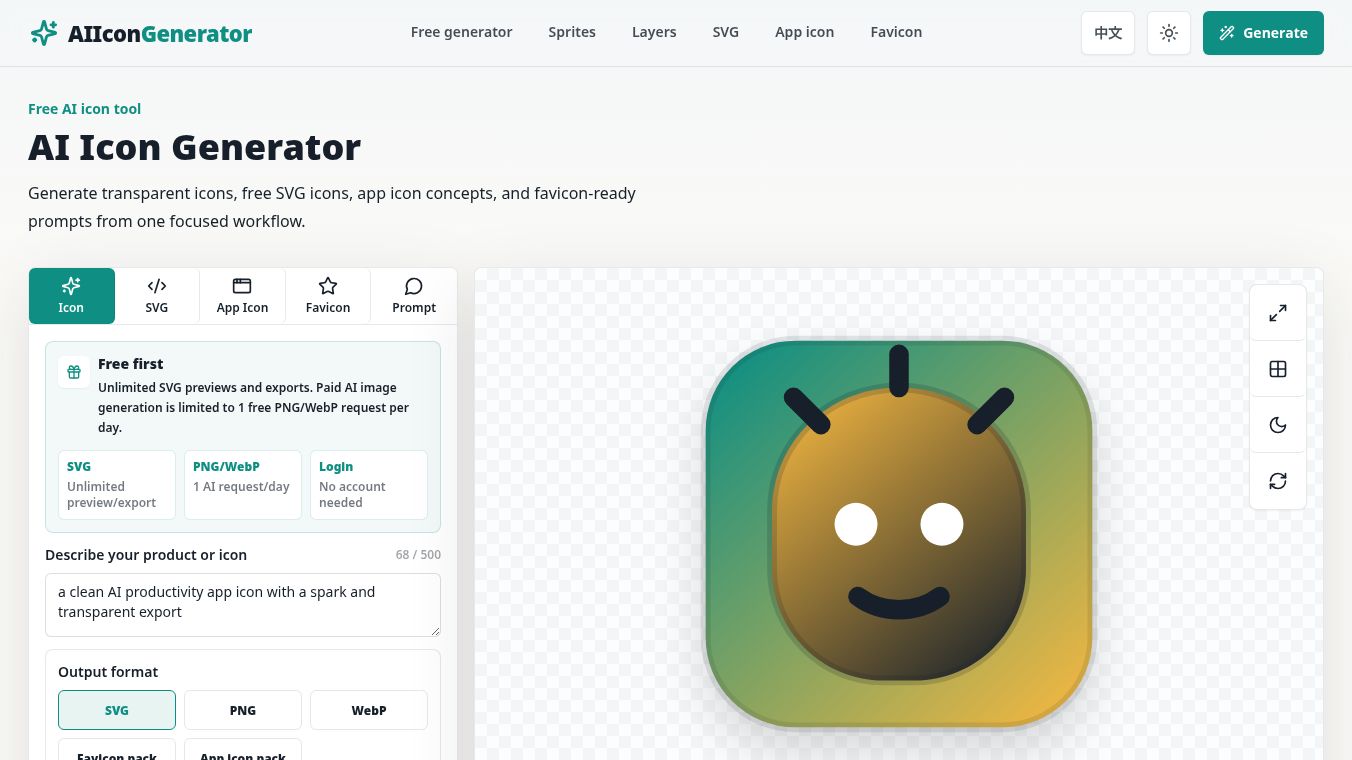
The Free AI Icon Generator is a specialized tool designed to transform short product ideas into clean, professional icon assets. It operates on a focused workflow, generating transparent icons, free SVG icons, app icon concepts, and favicon-ready prompts. The tool is free to try with no sign-up required for prompt building, previewing, SVG copying, and PNG downloads, making it ideal for MVPs, SaaS products, websites, internal tools, and launch pages.
Benefits
The generator allows users to compare four distinct style directions—flat, gradient, 3D, and favicon-safe—in a single pass. The recommended workflow is straightforward:1.Describe the Idea:Input the product or icon concept (e.g., "AI productivity workspace with a clean spark symbol").2.Customize Parameters:Select the use case, style, shape, palette, and background.3.Generate Preview:Create a clean SVG preview based on the inputs.4.Export:Copy the prompt or download the SVG/PNG assets.
Prompt Engineering and Quality
The tool emphasizes prompt quality to ensure the resulting icons are functional and distinct. Key guidelines for generating high-quality icons include:*Symbolic Focus:Keep the prompt to one object with a clear silhouette.*Visual Clarity:Use a controlled gradient with one strong foreground mark rather than a busy background scene.*Color Palette:Utilize specific, strong colors (e.g., Teal, amber, ink) to ensure high contrast.*Constraints:Avoid text, watermarks, mockups, UI screenshots, or generic logo templates. The design must survive at 16px resolution.*Variation:If multiple variants are requested, vary the metaphor angle, internal geometry, and accent placement while maintaining the same design system.
Use Cases
The generator provides versatile export options tailored for different technical needs:*SVG:Copyable vector markup suitable for product UI, landing pages, and documentation. This format is scalable and editable.*PNG:Canvas-exported previews optimized for app stores, websites, and presentation decks.*WebP:Guidance for WebP-ready assets.*Favicon Pack:Notes and guidance for browser tabs, PWAs, and shortcuts.*Prompt:Compact prompts shaped specifically for clean silhouettes and no-text requirements.
Design Styles and Presets
Users can start from a clean visual language using several style presets:*Minimal:Simple silhouette.*Flat:Strong color blocks.*Outline:Stroke-first icon.*Gradient:Polished app icon look.*Glyph:Solid mark.*Mascot-lite:Character hint.
Technical Specifications and App Icon Sizes
The tool supports standard sizes for iOS and Android to ensure compatibility across platforms. Key dimensions include:*Large:1024px, 512px, 256px*Medium:180px, 167px, 152px, 120px*Small:87px, 80px, 76px, 60px, 58px, 40px, 29px
The tool also provides a "Quality Score" metric (e.g., 76/100) and specific sub-scores for readability (16px), no-text safety, contrast, platform fit, and style consistency to help users evaluate their generated assets.
Usage Guidelines and Best Practices
- Commercial Use:Users can use original prompts for commercial projects but must review results to avoid protected brands, characters, trademarks, or copied artwork.
- Transparency:Users can choose a transparent background for SVG and PNG workflows. It is recommended to test icons on light, dark, and screenshot backgrounds before launch.
- Platform Fit:Use SVG for product UI and docs; use PNG for app stores and social previews. Keep favicon shapes bold at 16px.
- Text Avoidance:Avoid placing text inside app icons to ensure legibility and platform compliance.
Frequently Asked Questions
- Is it free?Yes, SVG preview, SVG export, prompt copying, and PNG preview export are available without signing up. PNG/WebP AI generation uses a daily free AI request limit.
- Can I make transparent icons?Yes, by selecting a transparent background in the SVG and PNG workflows.
- What exports are supported?The tool supports copyable SVG, downloadable SVG, PNG preview downloads, WebP-oriented guidance, favicon pack notes, and app icon size checklists.
- How do I use the generated icons?Use SVG for UI integration and PNG for marketing assets. Always export final assets at the largest required size.
Conclusion
The Free AI Icon Generator serves as a rapid prototyping tool for designers and developers. By focusing on clean silhouettes, controlled palettes, and specific export formats, it streamlines the creation of essential visual assets for digital products, ensuring they are ready for immediate use in MVPs and SaaS launches.
This content is either user submitted or generated using AI technology (including, but not limited to, Google Gemini API, Llama, Grok, and Mistral), based on automated research and analysis of public data sources from search engines like DuckDuckGo, Google Search, and SearXNG, and directly from the tool's own website and with minimal to no human editing/review. THEJO AI is not affiliated with or endorsed by the AI tools or services mentioned. This is provided for informational and reference purposes only, is not an endorsement or official advice, and may contain inaccuracies or biases. Please verify details with original sources.





Comments
Please log in to post a comment.