Dosmos
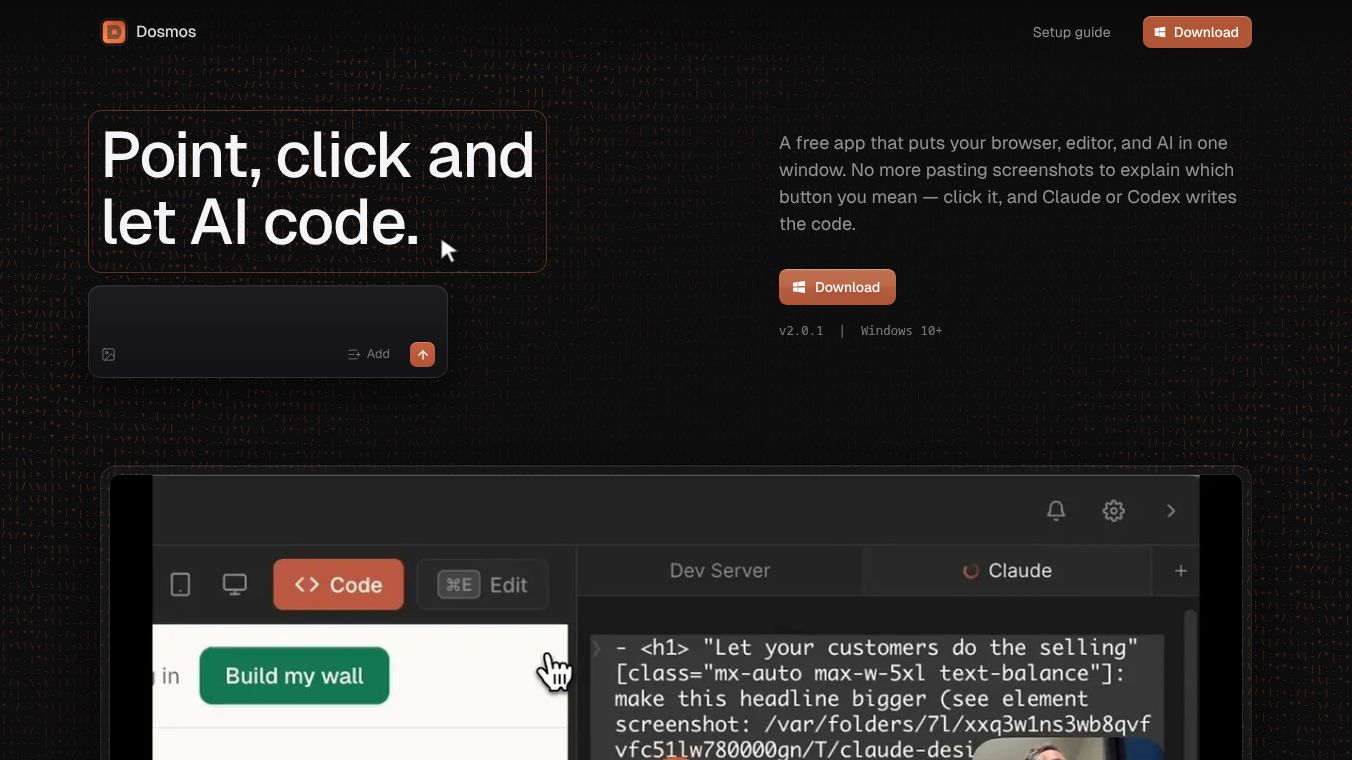





Dosmos: A Unified Desktop Environment for AI-Assisted Web Development
Research context and background
Dosmos is a free, open-source desktop application designed to streamline web development. It brings together a browser, code editor, terminal, and Chrome DevTools into a single window. The tool is built to enhance collaboration between developers and AI coding agents. It eliminates the need for screenshots or long descriptions when telling an AI to change code. This makes the process faster and more accurate for building websites.
Benefits
Dosmos offers several key advantages for developers who use AI to write code.
Direct Element Interaction: Users can click on any part of a running website. The AI then gets the exact source file and line number for that element. This removes the guesswork often found in traditional AI prompting. Users can also drag a box around an area to give the AI visual context. They can select multiple elements and send all changes at once.
All-in-One Workspace: All essential tools live in one window. The browser and code editor sit side by side. Clicking an element opens its source code on the exact line. The terminal is built right in for running commands. Full Chrome DevTools are docked inside the app. Users can inspect the DOM, debug JavaScript, and check network tabs without switching apps. File navigation uses simple shortcuts like CMD+P to jump to files and CMD+S to save with hot-reloads.
Smart AI Assistance: Dosmos helps AI agents work within the project's design system. Users can type a greater-than sign to search Tailwind tokens with color swatches. The AI writes the correct token instead of a hardcoded hex value. Holding the ALT key lets users inspect classes and colors. They can copy values and switch between hex, RGB, and HSL formats. Users can also switch between desktop, tablet, and mobile views instantly. Pressing F freezes animations, and keyboard shortcuts control grid lines.
Use Cases
Dosmos is ideal for web developers who want to speed up their workflow using AI.
- AI-Powered Development: It works with existing command-line coding agents like Claude Code, Cursor, Codex, Antigravity, and Qwen. Developers can use these agents to write and modify code more effectively.
- Cross-Platform Testing: The tool allows developers to switch between different screen sizes instantly. This helps ensure the website looks good on phones, tablets, and desktops.
- Debugging and Inspecting: Developers can use the integrated Chrome DevTools to debug issues without leaving their main workspace. This is useful for fixing JavaScript errors or checking network requests.
- Privacy-Focused Work: Since Dosmos keeps all code and API keys on the user's device, it is suitable for developers who are concerned about data privacy. No account creation or subscriptions are needed.
Pricing
Dosmos is completely free and open-source. There are no subscription fees, account requirements, or paid tiers. The software is available for macOS 13 or newer and Windows 10 or newer. Separate builds are provided for Apple Silicon and Intel Macs. Users can download and use it without any cost.
Vibes
Dosmos is designed to be a privacy-first tool that respects user data. All code, projects, and API keys stay on the user's device. Product analytics are optional, and auto-updates only check for new releases. There are no accounts or payments involved. The setup guide is written in plain English, making it easy for users to go from a new computer to a running project. The community sees it as a significant step forward in AI-assisted web development because it provides a unified environment where developers can interact with code and AI agents with precision.
Additional Information
Dosmos does not include its own AI model. Instead, it runs on top of existing command-line coding agents. This means users must have a compatible agent installed to use the tool. The project emphasizes privacy by keeping everything local. It also supports standard development workflows with hot-reloads and simple file navigation. The tool is actively developed to support the growing ecosystem of AI coding assistants.
This content is either user submitted or generated using AI technology (including, but not limited to, Google Gemini API, Llama, Grok, and Mistral), based on automated research and analysis of public data sources from search engines like DuckDuckGo, Google Search, and SearXNG, and directly from the tool's own website and with minimal to no human editing/review. THEJO AI is not affiliated with or endorsed by the AI tools or services mentioned. This is provided for informational and reference purposes only, is not an endorsement or official advice, and may contain inaccuracies or biases. Please verify details with original sources.


Comments
Please log in to post a comment.