DevCleaner





DevCleaner: Free the Gigabytes Your Dev Tools and AI Apps Hoard
Introduction
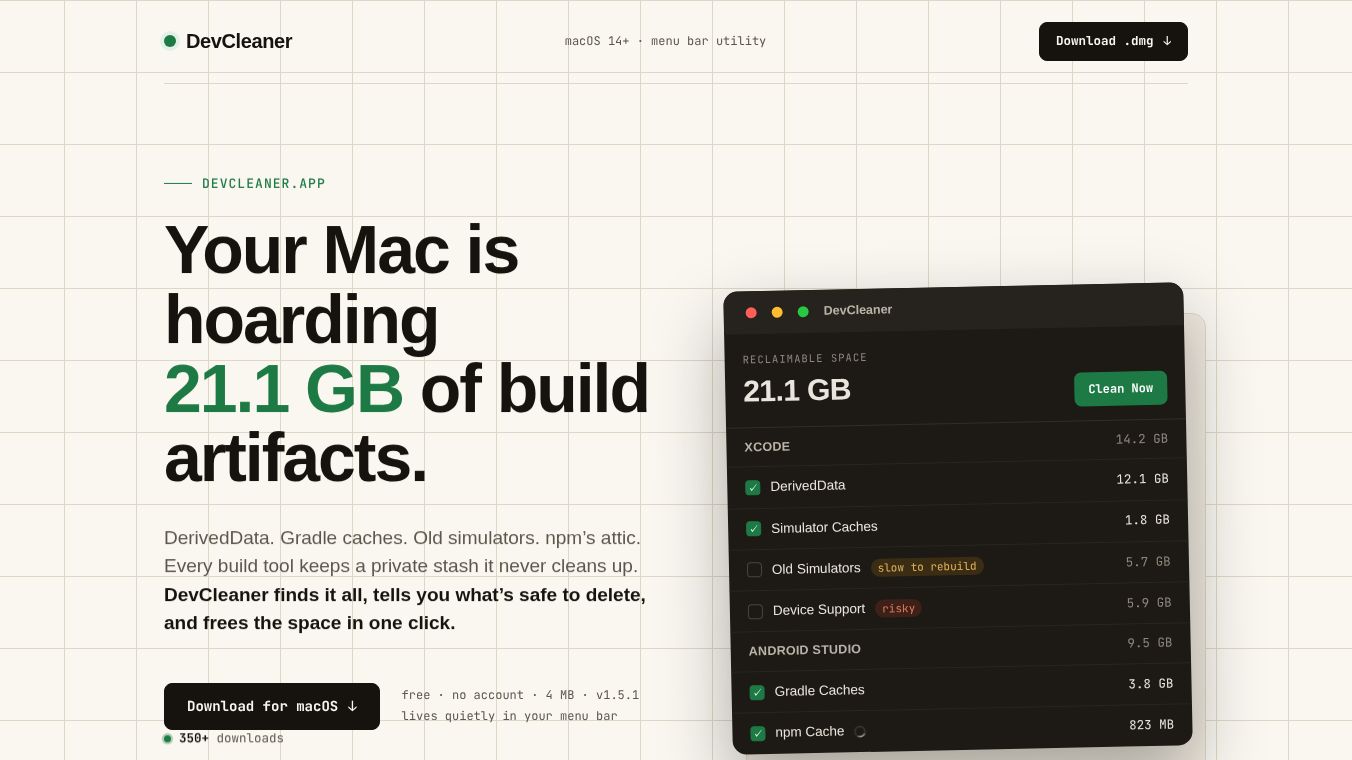
DevCleaner is a specialized tool for Mac computers that helps software developers reclaim lost disk space. It is a lightweight menu bar utility that runs quietly in the top corner of the screen. The app is designed to find and remove gigabytes of cached data, build artifacts, and temporary files created by development tools and artificial intelligence applications. It requires macOS 14 Sonoma or later and works on both Apple Silicon and Intel Macs. The entire application is only about 4 MB in size.
Benefits
DevCleaner offers several key advantages for users who manage complex development environments. First, it scans over 22 different development ecosystems to find hidden files. This includes tools for iOS, Android, web development, and local AI models. Second, it uses a smart safety system to prevent accidental data loss. The app categorizes files into three groups: SAFE, WARNING, and DANGER. Only safe items are deleted by default, while critical files like SDKs are protected unless the user explicitly chooses to remove them. Third, it provides real-time feedback. Users can watch the scan progress and see exactly how much space is being freed up as the app works. Finally, it is completely free and does not require an account or internet connection to function.
Use Cases
This tool is essential for software developers, DevOps engineers, and anyone who uses heavy development tools on a Mac. It is particularly useful for iOS developers who deal with large Xcode DerivedData folders. Android developers can use it to clear out old Gradle caches. Web developers can clean up Node.js package caches. It is also ideal for AI engineers who download large local models using tools like Ollama or Cursor. Common scenarios for using DevCleaner include preparing a computer for a large project download, freeing up space after a major operating system update, or performing routine maintenance before a project deadline. Users can also add custom folders to the scanner if they need to clean non-standard locations.
Pricing
DevCleaner is completely free to use. There are no hidden costs, subscriptions, or required account logins. The application operates entirely on the user's local machine and does not charge for its services.
Vibes
Users appreciate the tool for its precision and safety. Reviews highlight how it solves the frustrating problem of "disk space creep" where storage fills up silently over time. The three-tier safety model is frequently praised for giving developers confidence that they will not accidentally delete critical system components. The interface is described as unobtrusive and efficient, allowing users to reclaim significant storage with a single click. The fact that it supports modern AI tools is seen as a major advantage over older disk cleaners that do not understand these new applications.
Additional Information
DevCleaner is developed as an independent utility with a focus on community utility. It sends only a single anonymous number representing the total bytes freed to power a public community counter. This data helps users see how much space others are reclaiming. The app is distributed as a standard DMG installer and requires no installation process beyond opening the file. It is built specifically to address the unique needs of the software development workflow rather than general computer maintenance.
This content is either user submitted or generated using AI technology (including, but not limited to, Google Gemini API, Llama, Grok, and Mistral), based on automated research and analysis of public data sources from search engines like DuckDuckGo, Google Search, and SearXNG, and directly from the tool's own website and with minimal to no human editing/review. THEJO AI is not affiliated with or endorsed by the AI tools or services mentioned. This is provided for informational and reference purposes only, is not an endorsement or official advice, and may contain inaccuracies or biases. Please verify details with original sources.



Comments
Please log in to post a comment.