CrewCode
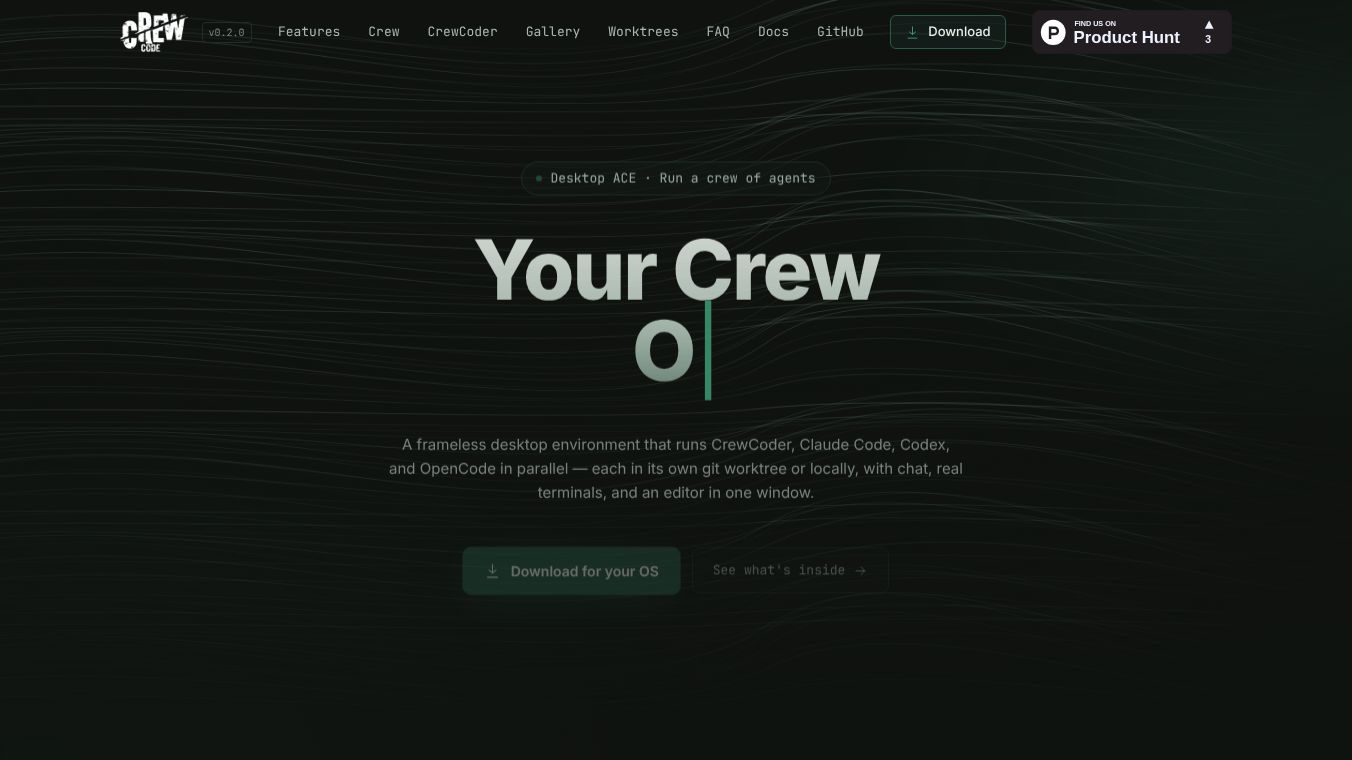





CrewCode: The Control Center for Multi-Agent Software Development
Overview
CrewCode is a free, open-source desktop application designed to help developers manage multiple AI coding agents at once. It acts as a single control center where users can run, watch, and review several AI tools working on a project simultaneously. Instead of switching between many different windows, terminals, and browser tabs, CrewCode brings everything into one place. It is built for people who work with Git repositories and want to use AI agents to help write or fix code without losing control of their project files.
Benefits
CrewCode offers several key advantages for developers who want to use AI to speed up their work. First, it allows users to run many AI agents in parallel. This means a developer can have one agent writing code, another running tests, and a third reviewing the work all at the same time. The app supports many different AI providers, so users can mix and match tools like Claude Code, Codex, or local models depending on their needs.
Second, CrewCode keeps everything safe and organized using Git worktrees. This feature lets users work on different versions of a project in separate folders without messing up the main code. The app can detect conflicts before they happen and helps recover work if a process gets interrupted. Users can also create and manage pull requests directly inside the app using GitHub integration.
Third, the app gives developers full visibility into what their AI agents are doing. A dashboard shows the status of every active agent, and users can see live updates in terminal panes. If an agent gets stuck, the user can restart it or mute it from the interface. The app also includes a built-in code editor with features like autocomplete and error checking to help review AI-generated code.
Finally, CrewCode is free and open-source. It is licensed under the Apache License, which means anyone can use, modify, or even include it in their own commercial software. The project welcomes contributions from the community to help improve the tool.
Use Cases
CrewCode is designed for specific types of developers who need powerful tools to manage AI workflows. It is best suited for solo developers who want to run multiple coding agents on real projects without getting overwhelmed by too many windows. It is also a great fit for technical founders who are using AI agents as parallel collaborators to build products faster.
Small engineering teams can also use CrewCode to explore supervised multi-agent workflows. The app allows team members to watch how agents interact with code and ensure that the AI is doing the right thing. For example, a developer might use CrewCode to draft a document, have an agent convert a PDF into an editable format, and then review the changes before saving the final file.
Another common use case is browser-to-agent research. Users can open a web page inside CrewCode, grab specific elements or screenshots, and send that information directly to an AI agent for analysis. The app also supports voice conversations, allowing developers to talk naturally to their coding agents and hear their responses in real time.
Pricing
CrewCode is completely free to use. It is an open-source project, so there are no subscription fees or hidden costs. Users can download the application and start using it immediately on their own computers.
Vibes
As a new open-source tool, CrewCode is currently in an early stage of development. The documentation highlights its potential to change how developers interact with AI coding agents. While there are no public reviews or testimonials available yet, the project has already attracted attention from the developer community for its ambitious features. The team is actively looking for feedback and contributions to help shape the future of the software. Early adopters who are comfortable with technical tools are likely to find the most value in this platform.
Additional Information
CrewCode is developed by OnPoint Tools and is currently in version 0.2.1. The application is built using modern web technologies like Electron, React, and TypeScript, which makes it run smoothly on Windows, Linux, and MacOS. The project is hosted on GitHub, and the source code is available for anyone to inspect or contribute to.
The app includes a local plugin system that allows developers to add custom features without giving up control of their system. Plugins are installed locally and run in a safe sandboxed environment. This design ensures that users can extend the functionality of CrewCode while keeping their data and system secure.
For those interested in using the voice features, CrewCode supports local inference using NVIDIA Parakeet and Kokoro models. This allows users to run speech recognition and synthesis entirely on their own hardware without sending data to the cloud. The app also requires a Python 3.11 environment for these specific features to work correctly.
This content is either user submitted or generated using AI technology (including, but not limited to, Google Gemini API, Llama, Grok, and Mistral), based on automated research and analysis of public data sources from search engines like DuckDuckGo, Google Search, and SearXNG, and directly from the tool's own website and with minimal to no human editing/review. THEJO AI is not affiliated with or endorsed by the AI tools or services mentioned. This is provided for informational and reference purposes only, is not an endorsement or official advice, and may contain inaccuracies or biases. Please verify details with original sources.
Comments
Please log in to post a comment.