




Clarity: AI Thinking Coach
Research Context and Background
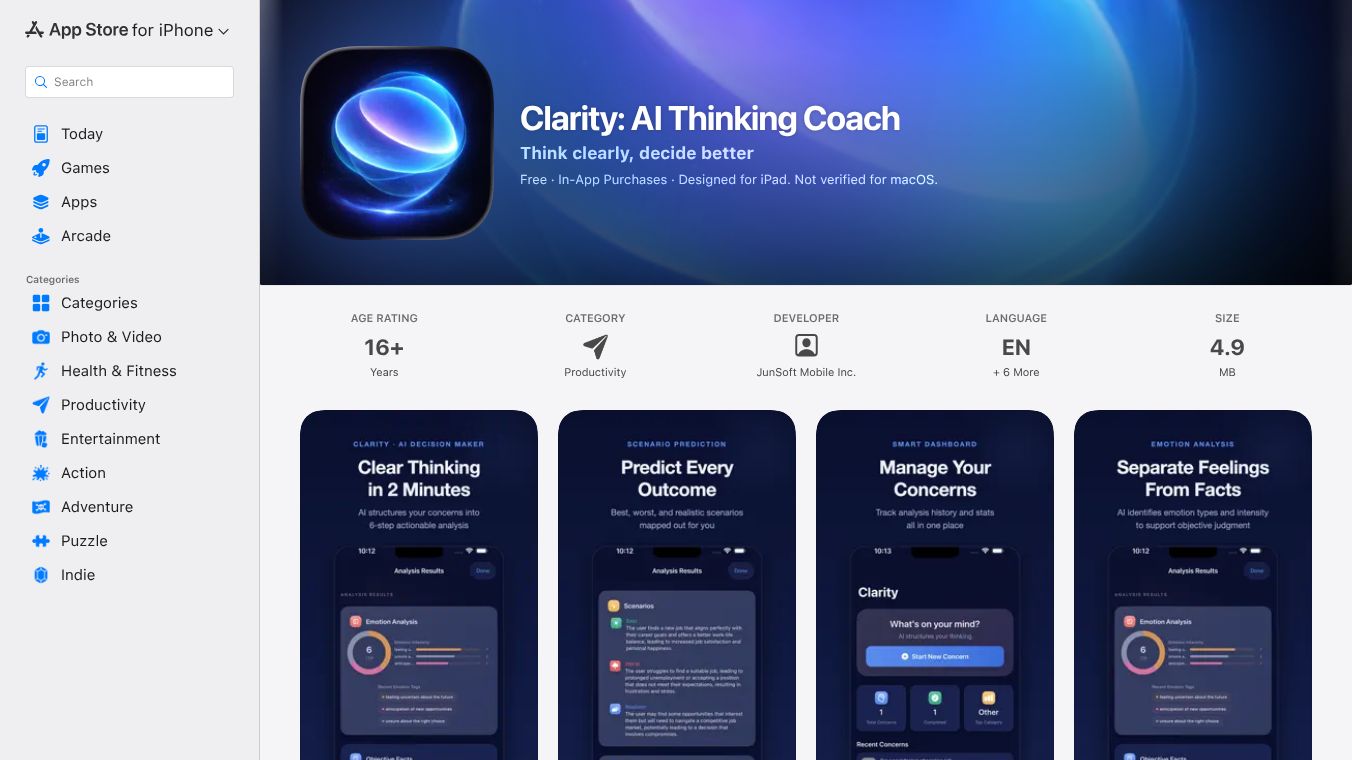
Clarity is an AI-powered thinking coach application designed to help users think clearly and make better decisions. Unlike traditional AI journaling apps that simply transcribe user input, Clarity structures thoughts into actionable decisions. It serves as a digital thinking coach rather than a diary, organizing complex mental clutter into a single, clear page. The app is developed by JunSoft Mobile Inc. and is available on iOS devices, including iPhones, iPads, Macs with M1 chips or later, and Apple Vision. It requires operating systems version 17.0 or higher for iPhones and iPads, version 14.0 or higher for Macs, and version 1.0 or higher for Apple Vision. The app supports multiple languages including English, French, German, Japanese, Korean, and various Chinese dialects.
Benefits
Clarity offers several key advantages for users who need to organize their thoughts and make important choices. The app processes user input to provide a structured analysis that includes a one-sentence clarification of the actual problem. It also classifies emotions with an intensity score to help users understand their feelings. A major feature is the separation of objective facts from subjective assumptions, which helps users see the truth behind their worries. The app generates choice cards that compare different options by detailing pros, cons, and risk levels. It also simulates best, worst, and likely outcomes for various scenarios. Finally, Clarity provides one concrete next step that users can take immediately. The app uses 15 distinct thinking frameworks such as SWOT, the Eisenhower Matrix, and First Principles to analyze situations. Privacy is a core design principle since user text is never stored on developer servers and analysis results live exclusively on the user's device.
Use Cases
Clarity is designed for a wide range of people facing different types of challenges. Knowledge workers can use it to manage daily decisions regarding job moves, project priorities, and negotiations. Founders and solopreneurs can use the app to test hypotheses, allocate resources, and make pivot calls for their businesses. Researchers and students can navigate career paths, thesis topics, and field choices with its help. Anyone facing major life decisions such as relocations, investments, or sabbaticals can benefit from its structured approach. The app is particularly useful when someone feels overwhelmed by mental clutter or when they need to break down a complex problem into manageable parts. Users can continue conversations after the initial analysis by asking follow-up questions to dig deeper into specific aspects of their decision.
Pricing
Clarity offers a free tier that includes 10 analyses per day. For users who need more features, there is a premium tier that offers unlimited analyses, follow-up chat, an insights dashboard, and monthly summaries. The monthly subscription costs $7.99. The yearly subscription costs $59.99. The app also includes subscription state alerts to notify users about trials ending or payment issues, along with a safety net that auto-detects payment failures and provides billing guidance.
Vibes
The app received updates in version 1.3 released on May 6 that introduced sharper coaching and a smoother user experience. These updates also added the German language and improved analysis speeds and accuracy. The developer focused on stability with better background handling and reduced memory pressure. Users can opt-in to analytics, but these are optional and can be disabled at any time in the settings. The app is rated 16+ due to unrestricted web access and health or wellness topics.
Additional Information
Clarity is developed by JunSoft Mobile Inc. and falls under the Productivity category. The app size is 4.9 MB. It supports Apple Sign-In for multi-device synchronization of subscriptions and sessions. The voice input feature uses the same iOS speech-to-text feed as typed input, ensuring consistent analysis regardless of how the user enters their thoughts.
This content is either user submitted or generated using AI technology (including, but not limited to, Google Gemini API, Llama, Grok, and Mistral), based on automated research and analysis of public data sources from search engines like DuckDuckGo, Google Search, and SearXNG, and directly from the tool's own website and with minimal to no human editing/review. THEJO AI is not affiliated with or endorsed by the AI tools or services mentioned. This is provided for informational and reference purposes only, is not an endorsement or official advice, and may contain inaccuracies or biases. Please verify details with original sources.
 No Info


Comments
Please log in to post a comment.