Brain Tracker





Brain Tracker: Visualizing and Analyzing Study Patterns
Introduction
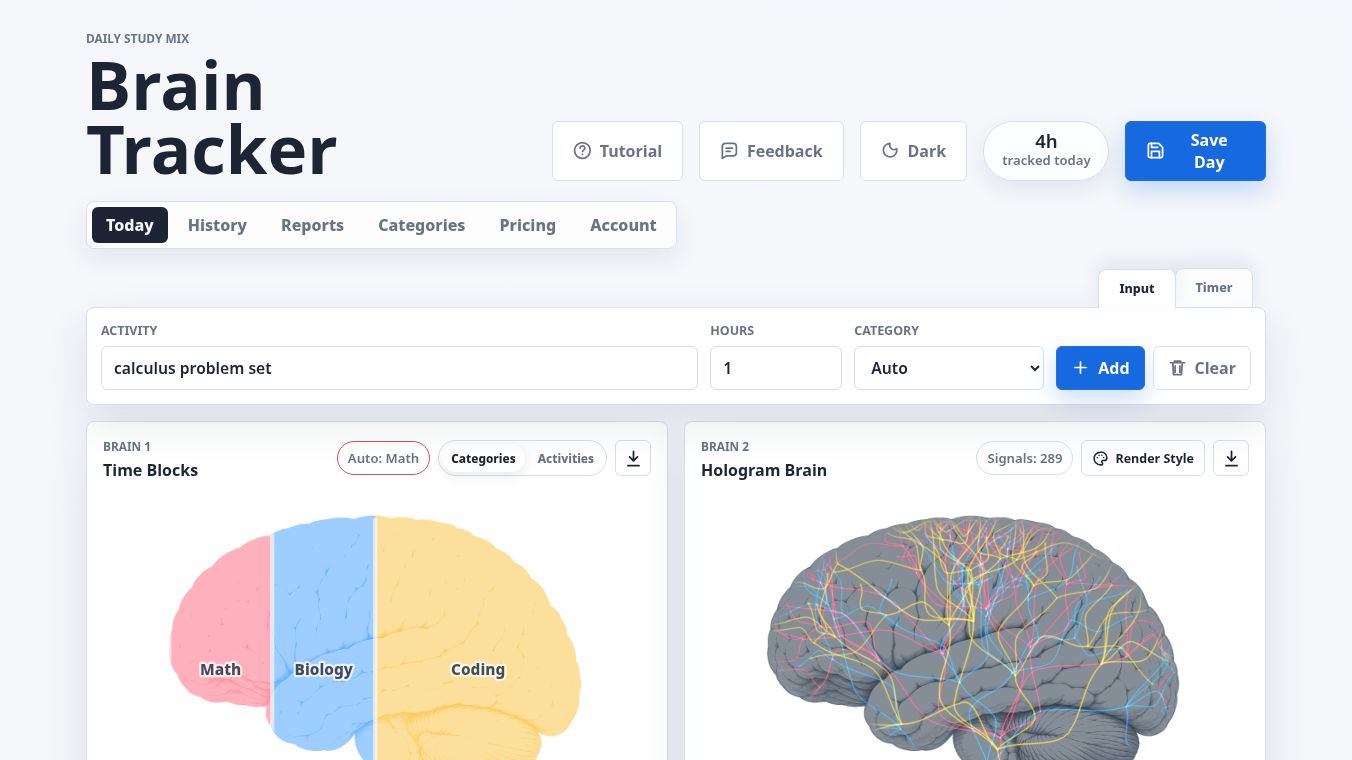
Brain Tracker is a digital tool designed to help students and learners build a longer memory of their study habits. It transforms raw study time into visual metaphors, allowing users to track, save, and analyze their learning patterns over time. The core philosophy is to turn study patterns into clean, actionable reports for reflection and accountability. The application offers two distinct visual styles to represent study time. The first style uses left-to-right color blocks where the size of each block is proportional to the selected label mode. The second style visualizes study time as luminous strands of light passing through a holographic brain. As study time increases, the count and intensity of these light strands grow, creating a dynamic visual representation of effort. It is important to note that these visualizations are metaphors for study focus and are not anatomically accurate maps of brain activity.
Benefits
Brain Tracker offers several key advantages for anyone looking to improve their study routine. Users can save daily visualizations to review later. The free version allows saving up to seven days of history. Upgrading to the Pro plan removes limits on saved history, allowing users to keep every daily brain indefinitely. User data, including entries, saved brains, categories, color palettes, and theme preferences, are synced to a private cloud account. This ensures data continuity across devices. The tool generates weekly summaries highlighting total hours, daily averages, top focus areas, and active days. Detailed statistics are provided for specific subjects or activities, helping users identify strengths and neglected areas. Comprehensive dashboards display highlights, what stood out during the period, and overall averages. Users can generate printable weekly summaries that include brain visuals, category shares, averages, and time totals. The platform also supports exporting clean, high-resolution images suitable for notes, progress posts, portfolios, or accountability check-ins.
Use Cases
Brain Tracker is ideal for students who want to visualize their learning journey. It can be used to track study time across different subjects or activities. Users can compare any custom time range to view total hours, per-day averages, and saved-day averages. The tool is useful for identifying which subjects require more attention and which areas are already strong. It helps users maintain accountability by providing clear reports on their progress. Students can use the high-resolution exports for their portfolios or to share their insights with friends and family. The cloud sync feature makes it perfect for users who study on multiple devices, ensuring their data is always available wherever they are.
Pricing
Brain Tracker offers two subscription tiers. The Free Plan includes limited saved history of seven days, standard rendering styles, and basic cloud sync capabilities. The Pro Plan is available for $1.99 per month. This plan provides unlimited memory to save every daily brain without trimming history. It unlocks unlimited custom date ranges for analysis. Users get access to printable PDF reports and high-resolution image exports. The Pro plan also offers deeper insights to spot strongest subjects, neglected categories, and weekly balance over time. To access Pro features and enable cloud sync, users must sign in first and complete the checkout process.
Vibes
The platform is designed to be user-friendly, offering a palette for customizing category colors and a simple interface to add new categories and manage existing ones. The secure security model protects user data using Supabase Auth. Row-level security policies ensure that only signed-in users can read or write their own data. The application encourages community engagement by allowing users to share the new website and their insights with friends. The focus on clean, actionable reports suggests a positive reception among users who value clarity and visual feedback in their study habits.
Additional Information
The application utilizes a secure security model to protect user data. Authentication is handled via Supabase Auth, supporting email password sessions, email confirmation, password resets, and token refresh. Data storage entries, saved brains, categories, palettes, and themes are stored in a private cloud state tied to the user account. The platform is built to be accessible and easy to use for both technical and non-technical readers.
This content is either user submitted or generated using AI technology (including, but not limited to, Google Gemini API, Llama, Grok, and Mistral), based on automated research and analysis of public data sources from search engines like DuckDuckGo, Google Search, and SearXNG, and directly from the tool's own website and with minimal to no human editing/review. THEJO AI is not affiliated with or endorsed by the AI tools or services mentioned. This is provided for informational and reference purposes only, is not an endorsement or official advice, and may contain inaccuracies or biases. Please verify details with original sources.
Other Interesting AI Tools



Comments
Please log in to post a comment.