Bonro
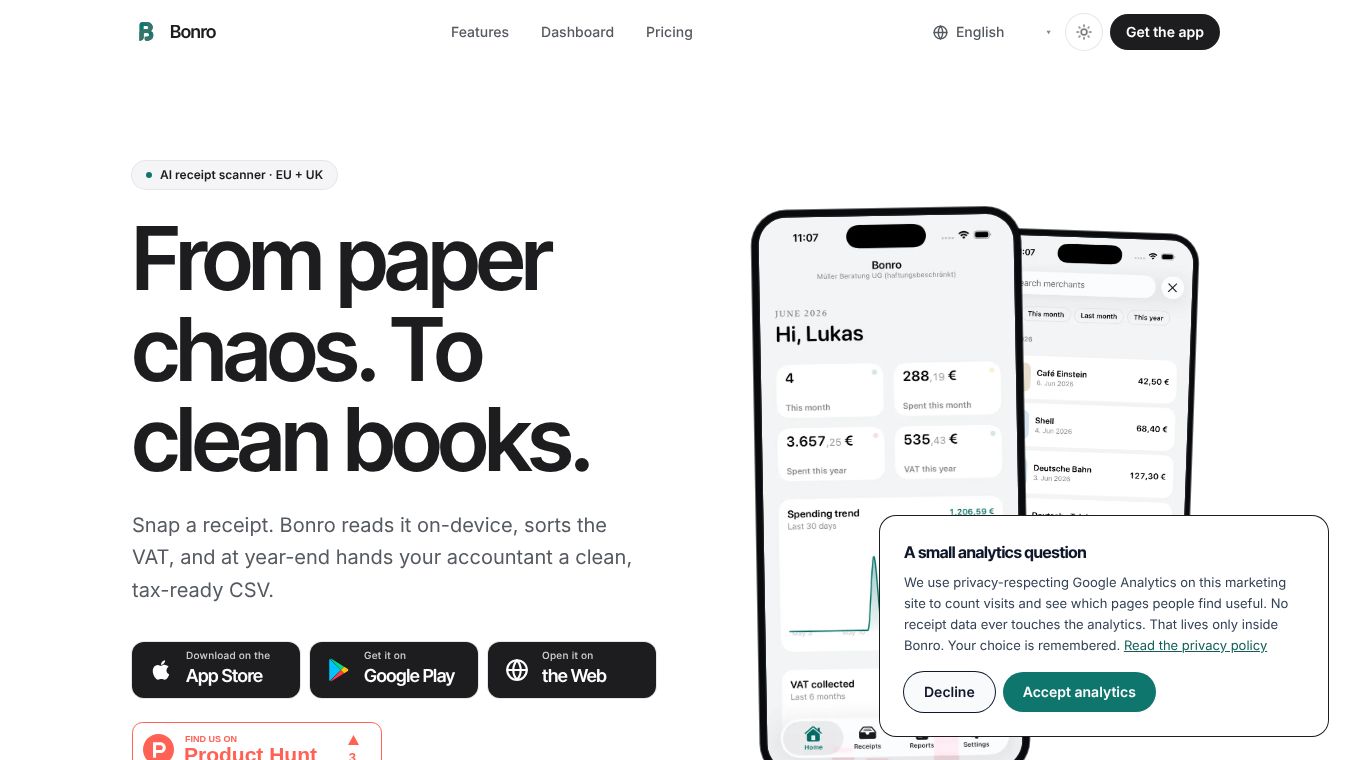





Bonro: Transform Paper Chaos into Clean, Tax-Ready Data
Bonro is a receipt management tool designed to streamline bookkeeping by converting physical and digital receipts into structured, tax-ready data. By leveraging on-device OCR and AI, it automates the extraction of key details, allowing users to focus on their business rather than manual data entry.
Benefits
Bonro simplifies the receipt capture process through three main capabilities. It uses on-device OCR to read text directly on your phone, ensuring raw images are never sent to analytics for privacy. The AI automatically identifies the merchant, date, total, VAT rate, and category, giving users full control over the data since all fields are editable. It also supports multi-format inputs, accepting paper receipts, PDFs, and digital invoices, including structured e-invoices from various countries. The dashboard provides live KPIs for monthly spending and recovered VAT, along with searchable tables and tax exports directly from the browser. Native tax exports ensure seamless integration with local accounting software for countries like Germany, France, Spain, Italy, the Netherlands, and the UK. The app handles recurring expenses automatically and is specifically designed for German tax rules regarding business meals. It supports multi-company management and offers offline functionality so receipts queue locally and sync when an internet connection is available. Bonro prioritizes data privacy with GDPR-ready servers in Frankfurt and allows users to export or delete their data directly within the app.
Use Cases
Bonro is ideal for freelancers, small business owners, and accountants who need to manage receipts efficiently. Users can scan receipts via camera, gallery, or PDF upload to capture financial data quickly. The app is useful for tracking monthly recurring expenses like rent or software subscriptions to prevent missed entries. It helps businesses manage multiple companies or freelancers with side projects by allowing separate exports. Users can forward supplier invoices via email, and Bonro will parse the attachment and file it automatically. The tool is particularly valuable for those in the EU and UK who need to generate native tax exports for their accountants. It works well in areas with poor connectivity due to its offline functionality. The dashboard allows users to filter and sort receipts by month, company, or status without needing to install any additional software.
Pricing
Bonro offers honest, transparent pricing with no per-receipt fees or hidden upsells. The free plan costs zero euros forever and includes five receipts per month. The Starter plan costs six euros and ninety-nine cents per month or fifty-nine euros and ninety-nine cents per year and allows thirty receipts per month. The Pro plan costs twelve euros and ninety-nine cents per month or one hundred nineteen euros and ninety-nine cents per year and provides unlimited receipts. Pricing is billed through Apple, Google, or the web checkout, with cancellation available at any time.
Vibes
Bonro is praised for its privacy-focused approach and ease of use. Users appreciate that the OCR happens on their phone rather than on a server, which keeps their raw photos secure. The automated extraction of data saves time on manual entry, making the bookkeeping process much smoother. The native tax exports are a major highlight for users in Europe who need to file taxes with local accountants. The app is considered reliable and user-friendly, with a clean interface that makes managing finances straightforward. Many users find the ability to manage multiple businesses from one place to be a significant advantage.
Additional Information
Bonro was founded with a focus on privacy and simplicity. The servers are located in Frankfurt, Germany, to support GDPR compliance. The platform covers Germany, Austria, France, Belgium, Spain, Italy, the Netherlands, Portugal, Ireland, and the United Kingdom. There are no additional costs beyond the chosen subscription tier, and there is no in-app advertising. The app does not replace a tax advisor but is designed to feed clean data to them so they can file while the user stops hand-typing. Users can delete their data by navigating to Settings and selecting Delete account to remove their profile, receipts, and exports.
This content is either user submitted or generated using AI technology (including, but not limited to, Google Gemini API, Llama, Grok, and Mistral), based on automated research and analysis of public data sources from search engines like DuckDuckGo, Google Search, and SearXNG, and directly from the tool's own website and with minimal to no human editing/review. THEJO AI is not affiliated with or endorsed by the AI tools or services mentioned. This is provided for informational and reference purposes only, is not an endorsement or official advice, and may contain inaccuracies or biases. Please verify details with original sources.

Comments
Please log in to post a comment.