AI Clothes Changer





The Ultimate Guide to AI Clothes Changers: A 2026 Overview
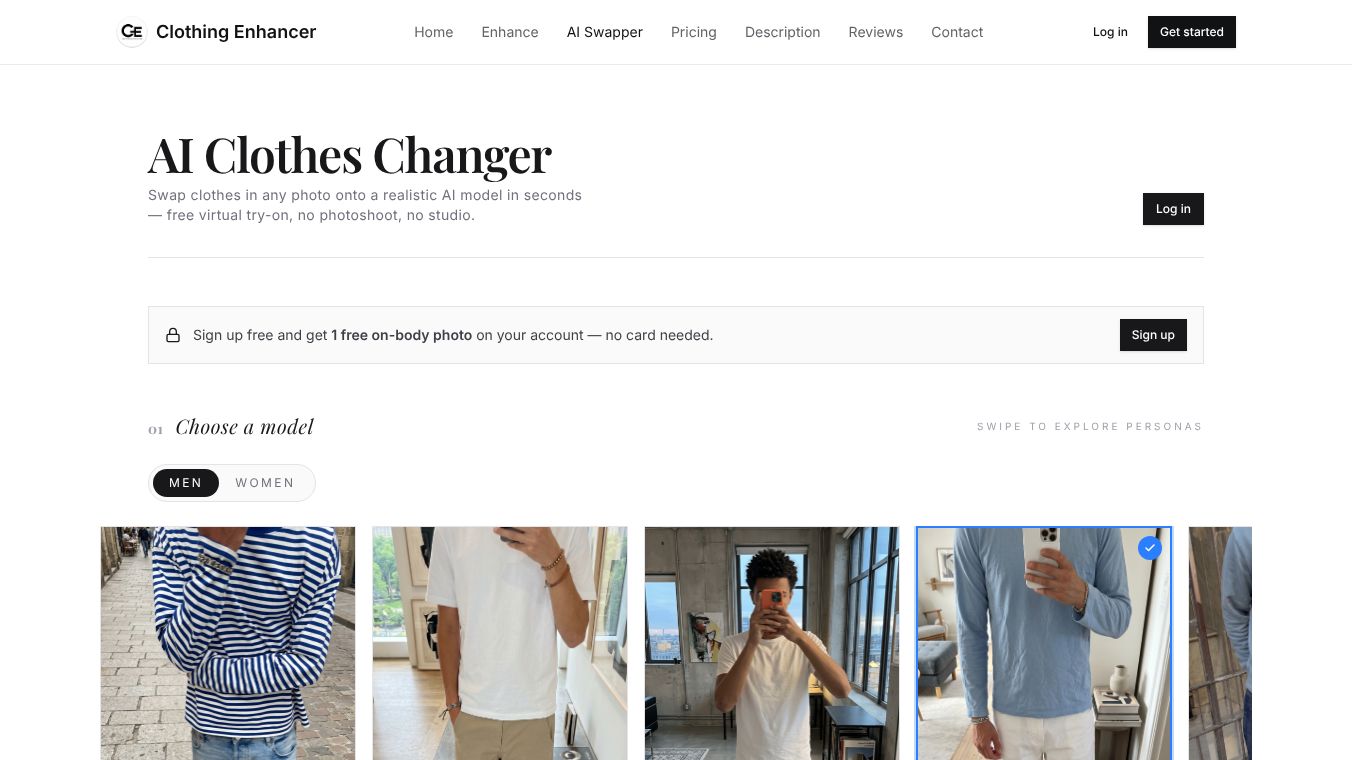
An AI clothes changer allows users to change the outfit in a photo or drop a new garment onto a fresh AI-generated model in approximately 20 seconds. This technology eliminates the need for Photoshop, manual masking, or traditional photoshoots. Below is a comprehensive guide on what these tools do, when to use them, how to operate them, and how to ensure high-quality results.
What an AI Clothes Changer Does
While the term "AI clothes changer" is often used broadly, it encompasses three distinct workflows:
- Garment to Model:Users upload a flat-lay image of a garment (e.g., a hoodie), and the AI generates a model wearing it. This workflow is primarily used by clothing sellers, resellers, and small brands.
- Photo to Different Outfit:Users upload a photo of a person and swap their current clothing for a different item (e.g., changing a t-shirt to a denim jacket) while maintaining the original pose and background.
- Photo to Cleaned-Up Outfit:The tool processes an existing photo of a person in an outfit to smooth wrinkles, correct colors, and clean up the background, keeping the outfit and pose identical.
When to Use an AI Clothes Changer
Ideal Use Cases
You should utilize an AI clothes changer when:*You are a reseller:You need on-body shots to sell items but do not want to hire models.*You run a small clothing brand:You cannot justify the cost of a photoshoot for every new product drop.*You need consistency:You want a lookbook featuring the same model, location, and lighting for every item.*You are testing designs:You need to visualize a design or colorway before committing to production.*You require fast ad creative:You need high-quality images quickly for platforms like Instagram, TikTok, or Meta ads.
When to Avoid AI Tools
You should avoid using an AI clothes changer when:*Shooting headline campaigns:The project requires a feel that is unmistakably human and authentic.*Featuring specific individuals:You need a specific real person, such as a celebrity, brand ambassador, or your own founder.*Producing large-format print:The project requires the pixel-level detail of a real medium-format shot for a retail environment.
Step-by-Step: Changing an Outfit with AI
Follow these steps to achieve professional results:
- Prep the Input:
- ForGarment-to-Modelworkflows: Use a flat-lay photo taken in soft daylight.
- ForOutfit-Swapworkflows: Use a photo where the person is in a normal standing or three-quarter pose, well-lit, with the outfit fully visible.
- Open the Tool:Launch your chosen AI platform.
- Pick Your Model:Select a persona that matches your brand aesthetic:
- Indoor mirror shot:Best for casual wear.
- Street style:Ideal for streetwear.
- Paris night:Suitable for premium items.
- Elevator:Best for editorial looks.
- Upload and Generate:Drop the file into the tool and hit generate. Results typically appear within 15–30 seconds.
- Iterate:If the result is not ideal, try a different persona or improve the input photo. Usually, two or three iterations yield a keeper.
- Download HD:Save the high-definition result for use in listings, product pages, or ad creatives.
How to Get Output That Doesn't Look Like AI
To distinguish professional AI edits from obvious artifacts, adhere to these three habits:*Feed the Whole Garment:Use full-frame flat-lays to produce full-body model shots. Cropped inputs often result in weird, chopped-up outputs.*Match the Persona to the Item:Ensure the model's setting fits the clothing. For example, a puffer jacket looks out of place on a beach persona, whereas a streetwear hoodie fits naturally in a Paris street shot.*Maintain Consistency:Stick to one or two personas across your entire catalog. Random models can make a store look chaotic; consistency signals professionalism to buyers and marketplace algorithms.
Free AI Clothes Changers Compared
The market for legitimate clothing seller tools is small, as many free options are general image editors or NSFW sites. Here is a comparison:*Clothingenhancer:Built specifically for clothing sellers. It offers a garment-to-model workflow, multiple personas, HD output, and integrates with photo editors and description generators. It is free to start.*General "Virtual Try-On" Apps:Often designed for shoppers rather than sellers and typically do not allow users to upload their own garments. These are not useful for store inventories.*Photoshop Generative Fill:While powerful, this requires a subscription and significant manual work per image, making it unviable for catalogs containing 200+ items.
Cost Comparison: AI vs. Real Photoshoot
A traditional clothing shoot involving a photographer and model typically costs between$800 and $2,500and takes1–3 weeksfrom booking to delivery. In contrast, an AI clothes changer costs a fraction of that per image and delivers results in under a minute. For weekly product drops, marketplace listings, and paid advertising, the efficiency and cost-effectiveness of AI tools are unmatched.
Conclusion
AI clothes changers offer a transformative solution for resellers and small brands looking to scale their visual content without the overhead of traditional photography. By understanding the workflows, selecting the right tools, and following best practices for input and persona selection, users can generate high-quality, professional-looking imagery rapidly.
This content is either user submitted or generated using AI technology (including, but not limited to, Google Gemini API, Llama, Grok, and Mistral), based on automated research and analysis of public data sources from search engines like DuckDuckGo, Google Search, and SearXNG, and directly from the tool's own website and with minimal to no human editing/review. THEJO AI is not affiliated with or endorsed by the AI tools or services mentioned. This is provided for informational and reference purposes only, is not an endorsement or official advice, and may contain inaccuracies or biases. Please verify details with original sources.


Comments
Please log in to post a comment.