AI CleanPage - Token Saver Side Panel





AI CleanPage: A Comprehensive Guide to Token-Efficient Webpage Extraction
Overview
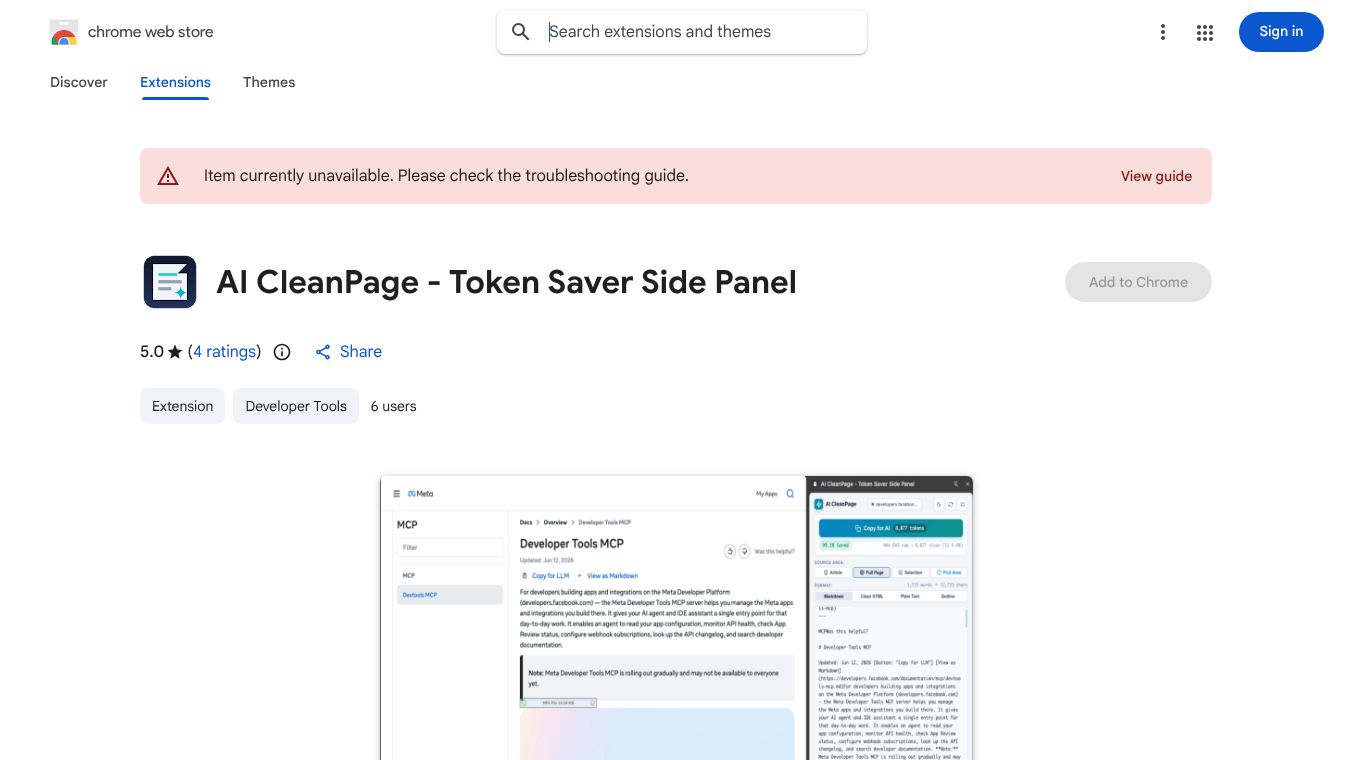
AI CleanPage is a native Chrome Side Panel extension designed to optimize the interaction between webpages and Large Language Models (LLMs) such as ChatGPT, Claude, Gemini, and local LLMs. Its primary function is to extract clean, CSS-free, and token-efficient representations of webpages, modals, forms, or selected areas in real-time. By stripping away unnecessary bloat, the extension ensures that users feed only essential semantic data to AI models, significantly reducing token consumption.
The Problem: Inefficiency in Raw Webpage Data
When users paste raw webpage HTML or standard browser dumps into AI models, a significant portion of the context window is wasted. Typically 70% to 90% of tokens are consumed by non-essential elements, including:* CSS classes and inline styling.* JavaScript trackers and scripts.* SVG graphics and base64 images.* Cookie consent banners and header/footer boilerplates.
This inefficiency leads to higher costs and slower processing times. AI CleanPage addresses this by deep-cleaning the active DOM locally, removing all styling and bloat while preserving the essential semantic structure, headings, code blocks, lists, links, form inputs, and tables.
Key Features
1. Native Chrome Side Panel
The extension operates as a native Side Panel, residing smoothly alongside the active tab without obscuring the user's work. This allows for real-time extraction and analysis without disrupting the browsing workflow.
2. Massive Token Savings
AI CleanPage includes a real-time token estimator that compares raw HTML against the cleaned output. Users can observe exact savings metrics, which typically range from 85% to 98% reduction in token usage.
3. Universal Modal & Dynamic App Support
The tool automatically detects and handles complex web structures, including:* React, Vue, and Bootstrap modals.* Dynamic form inputs.* Live JavaScript updates.
4. Visual Selection Tools
Users have flexible options for selecting content:* Visual Element Picker: Hover to pick any specific container.* Area Lasso Selector: Drag a box across any visual screen region to select an area.* Highlight Auto-Grab: A floating 1-click copy button appears instantly when highlighting text on any webpage.
5. Multiple AI Output Formats
The extension supports various formats tailored for different AI processing needs:* Clean Markdown (Recommended): Dense, readable GitHub Flavored Markdown (GFM) with clean tables, headings, and code blocks.* Compact Semantic HTML: Clean tag hierarchy stripped of all classes, inline styles, and attributes.* Structured Plain Text: High-readability clean text.* Outline & Heading Tree: A high-level structural map of H1–H6 headings.
6. AI Integration & Automation
- 1-Click AI Prompt Presets: Users can wrap content with pre-defined prompts such as "Summarize," "Extract Key Facts," "Analyze Code," or create custom templates.
- 1-Click AI Launchers: Copy content and instantly launch ChatGPT, Claude, or Gemini in new tabs.
- Quick Keyboard Shortcut: Press Alt+Shift+C to instantly copy clean Markdown from any page.
7. Customization and Privacy
- Themes: Features crisp, high-contrast Graphite UI with a custom light/dark theme toggle.
- Privacy: The extension is 100% private and local. Zero data leaves the user's machine; all processing occurs within the browser.
User Feedback
Users have praised the extension for its effectiveness in saving both money and time. Common sentiments include:* It is considered the best AI tool for saving tokens to date.* It provides a "mind-blowing" experience regarding efficiency.* It is highly recommended for anyone looking to optimize their AI interactions with web content.
Conclusion
AI CleanPage serves as a critical utility for developers, researchers, and anyone utilizing AI models to process web content. By eliminating the noise of modern web development (CSS, JS, trackers) and focusing purely on semantic data, it maximizes the efficiency of AI interactions, reduces costs, and streamlines the workflow.
This content is either user submitted or generated using AI technology (including, but not limited to, Google Gemini API, Llama, Grok, and Mistral), based on automated research and analysis of public data sources from search engines like DuckDuckGo, Google Search, and SearXNG, and directly from the tool's own website and with minimal to no human editing/review. THEJO AI is not affiliated with or endorsed by the AI tools or services mentioned. This is provided for informational and reference purposes only, is not an endorsement or official advice, and may contain inaccuracies or biases. Please verify details with original sources.
Comments
Please log in to post a comment.